Need help?
Do you have a question about the XLeader A8 and is the answer not in the manual?
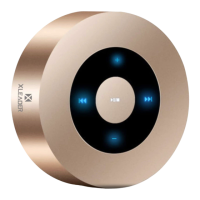
Details operation via touch screen for music, calls, and volume.
Emphasizes portability for pocket, purse, or backpack.
Notes that phone may display speaker battery life via Bluetooth.
Speaker automatically reconnects to paired device within 3 seconds.
Speaker powers off after 10 minutes of Bluetooth disconnection to save power.
Guides users to pair the speaker with phones and tablets through Bluetooth settings.
Outlines the process for connecting the speaker to computers and laptops via Bluetooth.
Specific instructions for pairing the speaker with MacBooks via Bluetooth preferences.
Details how to pair the speaker with Amazon Echo Dot devices using the Alexa app.
Steps to connect the speaker to Kindle devices via Bluetooth settings.
The XLEADER Touch Wireless Speaker A8 is a compact and elegantly designed audio device that combines smart touch screen technology with a focus on user convenience and sound quality. Its design, reminiscent of an Echo Dot, allows for intuitive operation through gentle fingertip touches on its controls.
The primary function of the XLEADER A8 is to provide wireless audio playback via Bluetooth, making it compatible with a wide range of devices including iPhones, Android phones, tablets, computers, laptops, MacBooks, Echo Dots, Kindles, MP3 players, PSPs, and TVs. Beyond Bluetooth, the speaker offers versatile connectivity options, supporting music playback from a Micro SD card and through an Aux (audio line-in) connection. It also features a built-in microphone, enabling hands-free calling when connected to a phone via Bluetooth. The speaker's automatic shutdown function, which activates after 10 minutes of Bluetooth disconnection, helps conserve power.
Operating the XLEADER A8 is designed to be straightforward and user-friendly.
The XLEADER A8 is designed with some features that contribute to its longevity and user experience.
The XLEADER A8 is a robust and user-friendly wireless speaker, designed to deliver clear and voluminous sound through its high-fidelity speakers and compact subwoofer, with sound engineered to reflect off the surface underneath for an enhanced audio experience. The manufacturer emphasizes continuous product improvement based on consumer feedback, ensuring a reliable and satisfying user experience.
 General
| Brand | XLeader |
|---|---|
| Model | A8 |
| Speaker Type | Portable Bluetooth Speaker |
| Battery Capacity | 1200mAh |
| Waterproof Rating | IPX5 |
| Connectivity Technology | Bluetooth |
| Bluetooth Version | 5.0 |
| Bluetooth Range | 10 meters |
| Charging Time | 3 hours |
| Color Options | Black, Blue |
| Special Feature | TF card support |

 To Next Page