
 Need help?
Do you have a question about the XM Warrior G1SA and is the answer not in the manual?
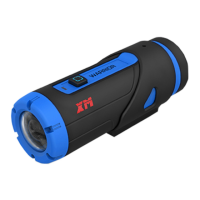
Controls camera functions like powering on, taking photos, and recording video.
Displays camera status such as charging, recording, and WiFi connection status.
Enables WiFi and remote control operation for the camera, both on and off.
Features a high-quality lens for capturing clear images and videos.
Used for connecting to a computer for data transfer and charging the camera.
Accommodates MicroSD cards up to 32GB for video and photo storage.
Allows restoring the camera settings to factory default.
Extends the range and performance of the camera's WiFi connection.
Connect the camera via USB to a DC 5V adapter for charging, indicated by red/green LEDs.
Start up the camera quickly via the main button or mandatory power off/on with main and WiFi buttons.
Long-press main button for 1080p@30fps video; adjust resolution/frames via Home7 App.
Use the main button to capture photos; adjust resolution and modes via the Home7 App.
Connect via WiFi hotspot, then open Home7 App for live video viewing.
Use the USB cable to connect to a PC, access files via the "NO NAME" folder.
Avoid extreme temperatures, drops, excessive force, water, and disassembly for safe operation.
 General
| Wi-Fi | Yes |
|---|---|
| Screen | LCD |
| Image Resolution | 12MP |
| Waterproof | Up to 30m |
| Screen Size | 2.0 inch |
| Battery Life | Up to 90 minutes |
| Connectivity | USB |
| Storage | MicroSD |

 To Next Page