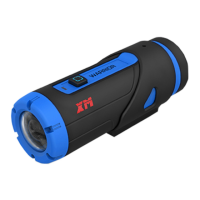
Main Button
Photo/Video/Power
1. Turn the camera on
2. Take single photograph by short-press
3. Take video by long-press
Show the camera status
Flashing green once: Take a photo
Flashing green continuously: Recording video
Always green: Camera turn on
No light: Camera turn off
Flashing blue continuously: WiFi turn on
Flashing red continuously after power off: Remote control pending
Turn WiFi on/off by long-press
Turn remote control on/off by short-press
1. Connect to computer for data transfer
2. Charge your camera
Insert Micro SD card, up to 32GB
Camera charging status
Red: camera is charging
Green: charging finished
Restore to factory default setting
2.Using Your Camera
2.1 Charging up Your Camera
Open the back cover, charge your camera with the USB cable and DC 5V/2A
or 5V/1A adapter. The red LED lights up to indicate the camera is charging and
turns green as soon as the camera has been fully charged. It takes about
5hours to fully charge the camera.
2.2 Power on/off Your Camera
Power on: The Warrior camera can startup within 1 second by short-press
main button ; If the Warrior camera is already mandatory power off, press
main button and WiFi button at the same time to mandatory
power on.


 To Next Page