EasyManua.ls Logo

Xomax XM-R281 - User Manual

Xomax XM-R281
5 pages
Print Icon
To Next Page IconTo Next Page
Loading...
CAR AUDIO
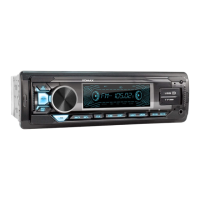
CAR MP3 PLAYER WITH RADIO USB/SD/MMC MANUAL
XM-R281
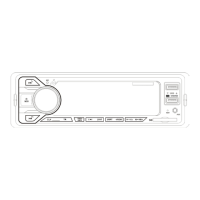
1. Power on / off /Mode
2. TR: Color change
3. Change radio channel /
Search automatically/Storage button
(BND/AMS)
4. Radio memory number(1.2.3.4.5.6)
5. Radio search forward/Next song
/Answer the call
6. LCD
7. CLK: Clock
8. USB slot
9. AUX: Aux in
10. SD/MMC slot
11.Knob: Volume button/ Sound effect
chanage
12.Radio search backward/previous
song/Ring off
13. RST: Reset
14. 5/-10: Last 10 songs/Last folder
15. 6/+10: Next 10 songs/next folder
16. MIC
17. Fast charge USB
18.IR: Remote control receive window
Question and Answer IconNeed help?

Do you have a question about the Xomax XM-R281 and is the answer not in the manual?

Overview

This document describes the XOMAX XM-R281 CAR MP3 PLAYER WITH RADIO USB/SD/MMC.

Function Description:

The XOMAX XM-R281 is a car MP3 player with an integrated radio, USB, SD, and MMC card support, and Bluetooth functionality. It allows users to play music from various sources, listen to radio stations, and manage calls via Bluetooth.

Usage Features:

Basic Operation:

  • Power On/Off: A short press powers the device on, while a long press powers it off.
  • Mode Selection: Short pressing the "MODE" button (not explicitly labeled but implied by context) cycles through available modes: Radio, SD/MMC, USB, AUX IN, and BT (Bluetooth).
  • Volume and Sound Effects: The "Knob" (11) controls the volume. Pressing "SEL" (part of the knob functionality) allows selection of sound effects such as Volume, Bass, Treble, Balance, Fade, Loudness (OFF/ON), and Bluetooth volume. When in EQ function, the knob can be turned left or right to select EQ presets like POP, ROCK, CLASS, and FALT.
  • LCD Display: The LCD (6) shows the radio frequency and content information for SD/USB playback.
  • Clock: A short press on the "CLK" button (7) displays the current time. A long press makes the clock time flash, allowing adjustment of hour/minute using buttons (5) and (12).

Radio Features:

  • Band Selection (FM button / Search and store automatically): In radio mode, repeatedly pressing this button (4) changes the band (FM1-FM2-FM3). The system can automatically search and save radio stations into memory.
  • Radio Channel Change / Search (BND/AMS): Button (3) allows changing radio channels, searching automatically, and storing stations.
  • Radio Memory Numbers (1.2.3.4.5.6): Buttons (4) allow direct access to stored radio stations. A long press on any number button (1-6) saves the current station to that number.
  • Radio Search Forward (5): Short press searches forward automatically. Long press (about three seconds) initiates manual search; subsequent short presses fine-tune the station. If no button is pressed for 5 seconds, the manual search function exits.
  • Radio Search Backward (12): Short press searches backward automatically. Long press (about three seconds) initiates manual search; subsequent short presses fine-tune the station. If no button is pressed for 5 seconds, the manual search function exits.

Media Playback Features (USB/SD/MMC):

  • USB Slot (8): Insert a USB disk to play music.
  • SD/MMC Slot (10): Insert an SD/MMC card to play music.
  • Aux In (9): Connect external music devices via the AUX in hole.
  • Pause/Play: Short press "►II" (part of button 5 functionality) to pause, press again to play.
  • Next Song: Short press "►►I" (part of button 5 functionality) to play the next song.
  • Previous Song: Short press "I◄◄" (part of button 12 functionality) to play the previous song.
  • Scan Function (INT): Short press "INT" (part of button 4 functionality) to scan tracks.
  • Repeat Function (RPT): Short press "RPT" (part of button 4 functionality) to repeat the current track.
  • Random Play Function (RDM): Short press "RDM" (part of button 4 functionality) to play tracks in random order.
  • Last 10 Songs/Last Folder (5/-10): Short press (14) to jump back 10 songs. Long press to go to the last folder.
  • Next 10 Songs/Next Folder (6/+10): Short press (15) to jump forward 10 songs. Long press to go to the next folder.

Bluetooth (BT) Operation:

  • Automatic Activation: BT is turned on by default when the player powers on.
  • BT Mode Selection: Short press "MODE" to select BT mode. The BT symbol will flash.
  • Connection Indicator: The BT symbol stops flashing once a mobile phone successfully connects.
  • Music Playback: Play music from a mobile phone via Bluetooth.
  • Call Management: Short press the "?" button (part of button 12 functionality) to answer or ring off a call.

Additional Features:

  • Color Change (TR): Button (2) allows changing the display color. After power on, it automatically cycles through seven colors every 3 seconds. A short press selects a single color. Pressing again chooses another color. Pressing twice returns to automatic seven-color change. A long press powers off the color light.
  • Fast Charge USB (17): This USB slot is specifically for cellphone charging.
  • Remote Control Receive Window (IR): (18) for remote control functionality.
  • Microphone (MIC): (16) for hands-free calling.

Maintenance Features:

  • Reset Button (RST): (13) If the system crashes, press this button to restart.
  • Troubleshooting Guide: The manual includes a troubleshooting section for common issues like no LCD display, no sound, low sound, and mono track.
    • No LCD Display: Check yellow wire connection to battery (+) and fuse of red wire.
    • No Sound: Check power supply, speaker wire connection, and content/cleanliness of SD/MMC card or USB disk.
    • Low Sound: Check power internal resistance and antenna connection.
    • Mono Track: Check speaker wire connection and amplifier integrated circuit.

Important Technical Specifications:

Tuner Part:

  • FM Frequency Range: 87.5MHz-108MHz
  • FM Noise-Limited Sensitivity: ≤26dB
  • FM Signal to Noise Ratio (S/N): ≥45dB

USB/MMC/SD Part:

  • Frequency Response: 100Hz-10kHz (+10dB)
  • MP3 Bit Rates: 8-320kbps
  • Channel Balance: ≤3 dB
  • Channel Separation: ≤22dB
  • MP3 Signal to Noise Ratio (S/N): ≥55dB

General:

  • Working Voltage: 12V DC
  • Real Power Output: 4x60W/14.4V
  • Speaker Impedance: 4Ω-8Ω
  • Size Dimension: 180mm (W) x 52mm (H) x 115mm (L)

Wiring Diagram:

The manual provides a detailed wiring diagram for installation, including connections for:

  • RCA OUT (Front R, Front L, Rear R, Rear L)
  • Antenna terminal
  • Ignition switch (red)
  • Speaker wires (gray, gray/black, blue, blue/black, green, green/black)
  • Yellow wire to positive pole
  • Black wire to negative pole (+12V DC NEGATIVE GROUND)
  • 10A FUSE

Note: Technical data is subject to change without prior notification.

Xomax XM-R281 Specifications

General IconGeneral
BrandXomax
ModelXM-R281
CategoryCar Stereo System
LanguageEnglish

Related product manuals