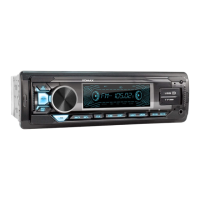
This document describes the XM-RD275 Car MP3 Player with Radio, USB/SD/MMC. It provides a comprehensive overview of its functions, technical specifications, usage, and basic troubleshooting.
Function Description
The XM-RD275 is a car audio system designed to play MP3 files from USB, SD, and MMC cards, as well as receive radio broadcasts. It features a user-friendly interface with a knob for volume and sound effect changes, and various buttons for mode selection, track control, radio tuning, and clock settings.
Key Functions:
- Power On/Off: Short press to power on, long press to power off.
- Volume Control: A knob allows for adjusting the volume.
- Sound Effect Change: Pressing the SEL button (part of the knob) allows cycling through various sound effects and audio settings, including Volume, Bass, Treble, Balance, Fade, Loudness (on/off), and Bluetooth volume. When in EQ function, the knob can be turned to select EQ modes like POP, ROCK, CLASS, and FALT.
- Mode Selection: A dedicated button allows switching between Radio, SD/MMC, USB, AUX IN, and Bluetooth modes.
- Radio Tuner:
- Band Selection: In radio mode, repeatedly pressing the FM button cycles through FM1, FM2, and FM3 bands.
- Automatic Search and Store: The system can automatically search for and save radio stations into memory numbers.
- Manual Search: Long pressing the search buttons (forward/backward) initiates a manual search. Short pressing then allows fine-tuning the station. The manual search function times out after 5 seconds of inactivity.
- Memory Presets: Six numbered buttons (1-6) allow users to save and recall their favorite radio stations. A long press on a number button saves the current station, and a short press recalls it.
- Media Playback (USB/SD/MMC):
- Insertion: Insert a USB disk into the USB slot or an SD/MMC card into its respective slot on the front panel to play music.
- Playback Controls:
- Pause/Play: Short press the play/pause button to pause playback; press again to resume.
- Next/Previous Track: Short press the next/previous track buttons to skip tracks.
- Scan Function (INT): Short press the INT button to scan tracks.
- Repeat Function (RPT): Short press the RPT button to repeat the current track.
- Random Play (RDM): Short press the RDM button to enable random play.
- Folder/Song Navigation: Short press the -10/+10 buttons to skip 10 songs backward/forward. Long pressing these buttons navigates to the previous/next folder.
- AUX Input: A dedicated AUX in hole allows connection of external audio devices.
- Clock Function:
- Display: Short press the CLK button to display the current time.
- Setting: Long press the CLK button until the time flashes, then use buttons 5 and 12 to adjust hours and minutes respectively.
- Color Change (TR): After power on, the device automatically cycles through seven colors every 3 seconds. A short press of the TR button selects a single color. Pressing it again selects another color. Pressing it twice quickly returns to the automatic seven-color change. A long press powers off the color light.
- Fast Charge USB: A dedicated USB slot is provided for cellphone charging only.
- Reset (RST): A reset button is available to restart the system in case of a crash.
- Remote Control: An IR window indicates the receiver for a remote control.
- Bluetooth (BT) Operation:
- Default On: Bluetooth is enabled by default when the player is powered on.
- Mode Selection: Select BT mode using the MODE button. The BT symbol will flash until a successful connection is made with a mobile phone.
- Music Playback: Play music from a mobile phone via Bluetooth.
- Call Handling: Short press the call button to answer or ring off a call.
Important Technical Specifications
Tuner Part:
- FM Frequency Range: 87.5MHz-108MHz
- FM Noise-Limited Sensitivity: ≤26dB
- FM Signal to Noise Ratio (S/N): ≥45dB
USB/MMC/SD Part:
- Frequency Response: 100Hz-10kHz (+10dB)
- MP3 Bit Rates: 8-320kbps
- Channel Balance: ≤3 dB
- Channel Separation: ≤22dB
- MP3 Signal to Noise Ratio (S/N): ≥55dB
General:
- Working Voltage: 12V DC
- Real Power Output: 4x60W/14.4V
- Speaker Impedance: 4Ω-8Ω
- Size Dimension: 180mm (W) x 52mm (H) x 115mm (L)
Usage Features
- Intuitive Controls: The device features clearly labeled buttons and a multi-functional knob for ease of use.
- Memory Function: Radio presets and last played song/folder memory enhance user convenience.
- Multi-Source Playback: Supports various media sources including radio, USB, SD/MMC cards, AUX, and Bluetooth.
- Customizable Audio: Multiple sound effects and EQ modes allow users to tailor the audio output to their preferences.
- Visual Feedback: An LCD displays radio frequency and media content information. The TR button allows for customizable lighting colors.
- Hands-Free Calling: Bluetooth functionality enables answering and ending calls directly from the device.
Maintenance Features
Troubleshooting Guide:
- LCD Doesn't Display:
- Reason 1: Yellow wire not connected with battery +. Solution: Assure yellow wire is connected with battery +.
- Reason 2: Fuse of red wire is open. Solution: Replace fuse.
- No Sound:
- Reason 1: No power supply. Solution: Connect the power wire.
- Reason 2: Speaker wire is open circuit. Solution: Connect speaker wire.
- Reason 3: SD/MMC card, U disk don't have corresponding song format. Solution: Check the contents of SD/MMC card, U disk.
- Reason 4: SD/MMC card, U disk golden finger is dirty which causes bad contact. Solution: Clean with absolute alcohol.
- Low Sound (Not Clear):
- Reason 1: Power internal resistance is high. Solution: Replace the power supply.
- Reason 2: Antenna is bad contact. Solution: Tighten the antenna plug.
- Mono Track:
- Reason 1: One channel of speaker wire is open circuit. Solution: Connect speaker wire.
- Reason 2: Amplifier integrated circuit is damaged. Solution: Replace the IC of amplifier.
Wiring Diagram:
The manual includes a detailed wiring diagram for installation, showing connections for front/rear left/right speakers, RCA output, antenna, ignition switch, and power (12V DC negative ground). It also indicates a 10A fuse for protection.
Note: Technical data is subject to change without prior notification.

 Need help?
 General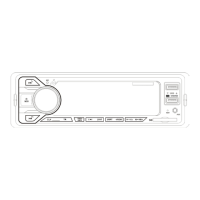

 To Next Page