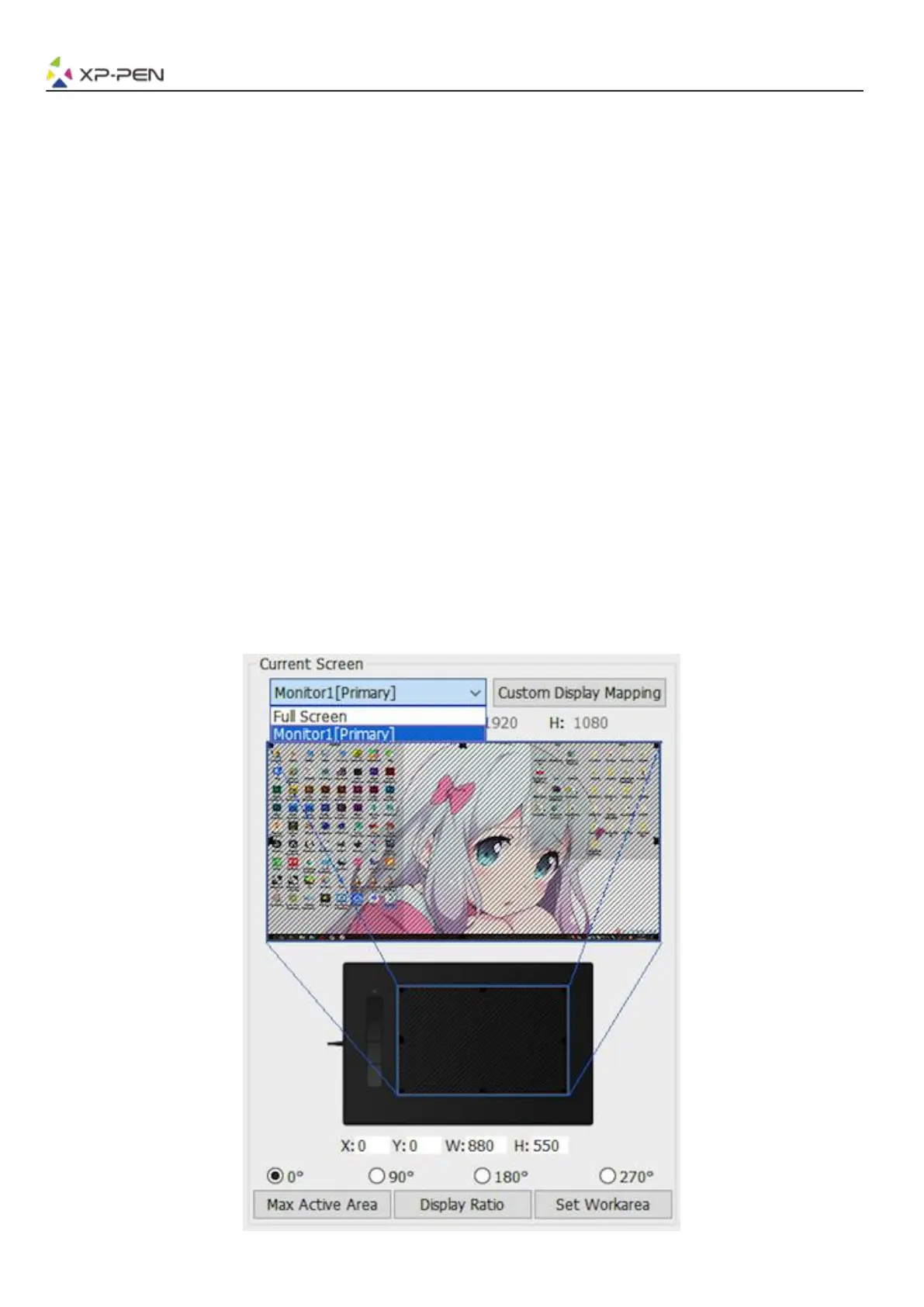
1.4. Current Screen
The G960, Q1S & Q1M may be configured for use with single or dual monitors.
If only one monitor is selected, your tablet input will be limited to that particular monitor.
Custom Display Mapping:
The dimensions of your tablet’s on-screen work area can be changed here. Please click the top-left and
bottom-right to customize.
0、90、180 & 270 angles:
The G960, Q1S & Q1M are set up for 0, 90, 180 and 270 angles and when you set it, you must also rotate
your G960, Q1S & Q1M.
Left hand is 180 angles.
You may adjust your tablet’s on-screen working area in this tab.
Set Work area:
When you click the “Set Work area” button, you can use the stylus pen to customize the G960, Q1S &
Q1M work area. Please click the top-left and bottom-right to customize.
Display Ratio:
You can set your G960, Q1S & Q1M work area adjusts the tablet’s on-screen working area to match
your monitor’s resolution.
Max Active Area:
You can set your G960, Q1S & Q1M work area to the max.
Image 3-5: Current Screen














 To Next Page