English - 5
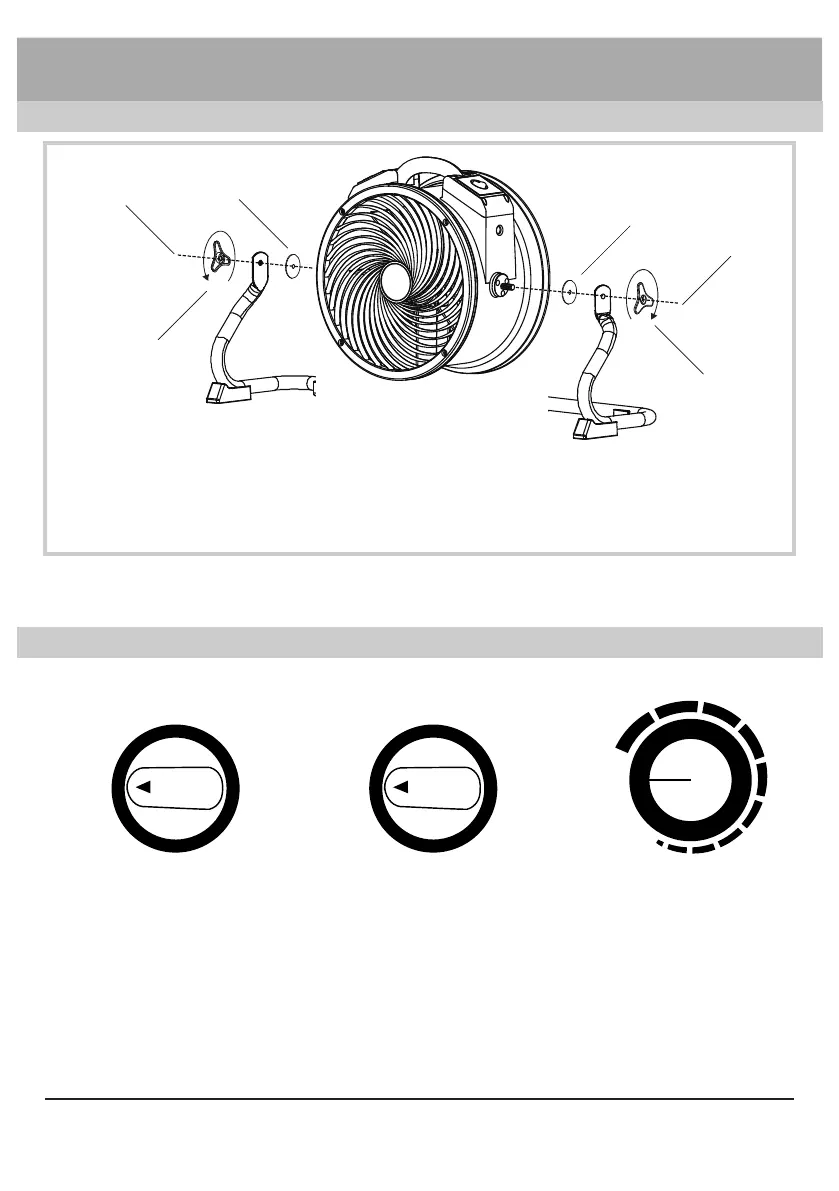
Installing the Rack*
①
①
③
②
②
③
①
Fit both rubber washers onto bolts on both sides of unit.
②
Align the rack onto the air circulator.
③
Fasten the connection with the rack handle.
* For model FC-300 only.
Installation and Operation Guide
Switch Plate
OFF
1
2 3
4
Four Speed Control
OFF 5
1
2 3
4
Five Speed Control
OFF
MAX
LOW
Variable Speed Control
Four Speed Switch ( For model FC-100/FC-200/FC-300 only)
• Turn to “OFF” position to switch the machine OFF. Turn to any speed position to switch
the machine ON.
• Turn clockwise to set the desired speed. There are 4 speeds from: 4, 3, 2, 1. “4” is the
highest speed and “1” is the lowest speed .


 To Next Page