EasyManua.ls Logo

XROCKER Ocelot Gaming Desk - User Manual

XROCKER Ocelot Gaming Desk
9 pages
Print Icon
To Next Page IconTo Next Page
Loading...
Ocelot
Gaming Desk
Assembly Instrucons
NEED HELP?
EMAIL: SUPPORT@XROCKERGAMING.COM
BESOIN D'AIDE?
COURRIEL: SUPPORT@XROCKERGAMING.COM
¿NECESITAS AYUDA?
CORREO ELECTRÓNICO: SUPPORT@XROCKERGAMING.COM
Question and Answer IconNeed help?

Do you have a question about the XROCKER Ocelot Gaming Desk and is the answer not in the manual?

Summary

Product Overview and Preparation

Tools and Requirements

Lists the necessary tools and indicates that assembly requires two people.

Box Contents

Parts Identification

Details and lists all physical parts included in the packaging.

Fittings and Hardware

Identifies and quantifies all screws, bolts, and other fittings required for assembly.

Sticker Application

Applying Decorative Stickers

Instructions and diagrams for applying the X Rocker branding stickers to the desk.

Assembly Instructions

Step 1: Attach Feet

Attaching the feet to the leg stands (parts 2 & 3).

Step 2: Connect Frame Components

Connecting the lower bar and steel frame to the leg stands.

Step 3: Install Support Bars

Attaching support bars to the steel frame and lower bar.

Step 4: Mount Holders

Attaching the headphone holder and cup holder to the desktop.

Step 5: Attach Desktop

Attaching the desktop surface to the assembled base.

Customer Support

Getting Help and Contact Information

Provides contact details, support webpage, and social media links for assistance.

Overview

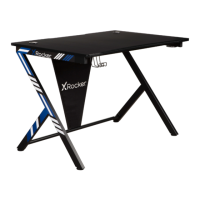
The X Rocker Ocelot Gaming Desk is a dedicated piece of furniture designed to enhance the gaming experience. It is an assembly-required desk, intended for a two-person build, and comes with an Allen key for assembly. The desk features a modern design with a black and blue color scheme, incorporating the X Rocker branding through included stickers.

Function Description:

The primary function of the X Rocker Ocelot Gaming Desk is to provide a stable and organized surface for a gaming setup. It is designed to accommodate various gaming peripherals and equipment, offering a dedicated space for immersive gameplay. The desk includes specific features to improve convenience and organization, such as a headphone holder and a cup holder, which are integrated into the desktop. The overall structure is built for stability, utilizing a steel frame and support bars to ensure durability during intense gaming sessions.

Important Technical Specifications:

While specific material types (e.g., type of steel, desktop material) are not explicitly detailed, the manual indicates the use of a "steel frame" and "support bars," suggesting a robust construction. The desk's dimensions are partially revealed through the sticker fitting instructions, which show measurements for various sticker components:

  • Sticker Lengths: 560mm and 700mm for the main frame stickers, and 365mm for smaller accent stickers. These dimensions indirectly suggest the approximate lengths of the desk's frame components.
  • Fittings:
    • Screws: Small (x8), Medium (x6), Large (x4). These variations indicate different connection points and load requirements across the desk's structure.
    • Feet: x4, suggesting a four-point base for stability.
    • Allen Key: x1, the sole tool required for assembly.

The desk is designed for a "2 person build," implying that some components might be large or heavy, requiring assistance for safe and efficient assembly.

Usage Features:

  • Dedicated Gaming Surface: Provides a spacious desktop (component 1) for monitors, keyboards, mice, and other gaming accessories.
  • Headphone Holder (component 7): A convenient hook located on the side of the desktop, allowing users to store their gaming headphones within easy reach and keep the desktop clutter-free.
  • Cup Holder (component 8): An integrated holder designed to secure a beverage, preventing spills on valuable gaming equipment. This feature is also attached to the desktop.
  • Cable Management (implied): While not explicitly detailed, the design of the steel frame and support bars often allows for some degree of cable routing, helping to maintain a tidy setup.
  • Aesthetic Customization: The inclusion of "STICKERS" (Left and Right sets) allows users to personalize the appearance of their desk, adding the X Rocker branding and blue stripe accents to the stands (components 2 and 3). These stickers are designed to fit specific sections of the desk, including the main frame and the "X" shaped stands.

Maintenance Features:

The manual does not explicitly detail maintenance features beyond the assembly instructions. However, typical maintenance for such a desk would involve:

  • Cleaning: Regular wiping of the desktop and frame with a damp cloth to remove dust and spills.
  • Tightening Fasteners: Periodically checking and tightening the screws (A, B, C) and feet (D) to ensure the desk remains stable and secure over time.
  • Sticker Care: Ensuring the applied stickers are not exposed to harsh cleaning agents or excessive friction to maintain their appearance.

Assembly Process Overview:

The assembly process is broken down into five clear steps:

  1. Attach Feet to Stands: The four feet (D) are attached to the left and right stands (2 and 3) using screws (D).
  2. Attach Lower Bar and Steel Frame: The lower bar (5) and the main steel frame (4) are connected to the stands (2 and 3) using medium screws (B) and the Allen key (E).
  3. Attach Support Bars: The two support bars (6) are attached to the steel frame (4) and the lower bar (5) using small screws (A) and the Allen key (E). The lower bar needs to be oriented correctly to align with the support bars.
  4. Attach Headphone and Cup Holders: The headphone holder (7) and cup holder (8) are attached to the desktop (1) using small screws (A) and the Allen key (E).
  5. Attach Desktop to Stands: The assembled desktop (1) is finally attached to the stands (2 and 3) using large screws (C) and the Allen key (E), completing the desk assembly.

The manual emphasizes the importance of retaining the original retail receipt as proof of purchase for any support inquiries. It also encourages users to share their product experience on social media platforms like Facebook, Instagram, Twitter, and TikTok, using the handle @XRockerGaming or @XRockerNation. For support, users are directed to email support@xrockergaming.com or visit www.xrockergaming.com/support.

XROCKER Ocelot Gaming Desk Specifications

General IconGeneral
BrandXROCKER
ModelOcelot Gaming Desk
CategoryIndoor Furnishing
LanguageEnglish

Related product manuals