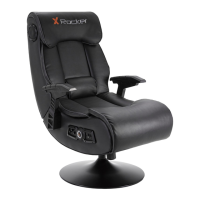
This document serves as a user manual for the X Rocker 2.0 BT gaming chair, providing essential information for assembly, operation, troubleshooting, and safety. The chair is designed to enhance the gaming experience with integrated audio capabilities.
Function Description:
The X Rocker 2.0 BT is a gaming chair equipped with Bluetooth connectivity, allowing users to wirelessly connect their mobile phones, tablet devices, or other audio output devices to the chair's integrated sound system. The chair is designed to provide an immersive audio experience during gameplay. It features a control panel with various functions, including power, volume, vibration, and bass control. The chair is intended for gaming support and comfort, with armrests designed for this purpose.
Important Technical Specifications:
- Connectivity: Bluetooth 2.0 BT
- Power Supply Unit Trademark: BI
- Power Supply Unit Model Name: BI12T-050100-BdU
- Power Input: 100-240V~, 50/60 Hz, 0.5A
- Power Output: 5 VDC, 1A
- Weight Limit: 250 lbs (Do not exceed this limit or stand on the chair)
- Bluetooth Passcode (if required): '0000'
Usage Features:
Assembly:
The chair requires assembly, which is detailed in a separate leaflet. Users are instructed to follow these assembly instructions first before proceeding with the audio setup.
Bluetooth Connection Guide (Mobile phones/tablet devices):
- Step 1: Ensure the power adapter is connected to the chair. Locate the wireless switch on the X Rocker control panel and set it to the Bluetooth position.
- Step 2: On your audio output device (mobile phone/tablet), navigate to its Bluetooth settings.
- Step 3: Turn Bluetooth on if it's not already enabled.
- Step 4: Search for available Bluetooth devices.
- Step 5: Upon finding "XROCKER," select this option to connect.
- Step 6: If a passcode is requested, enter '0000'.
Control Panel Features:
The control panel typically includes:
- Power: To turn the chair's audio system on/off.
- Volume: To adjust the audio output level.
- Vibration: To control the haptic feedback (if applicable).
- Bass: To adjust the bass level of the subwoofer.
- Input/Output Ports: For wired connections (e.g., AUX, MP3 IN, USB).
Troubleshooting Tips:
The manual provides a comprehensive troubleshooting section for common issues:
- No power going to control panel:
- Verify the power cable is correctly connected.
- Ensure the power supply at the source is working.
- With the chair ON, gently wiggle the power cable in the port; if lights flicker, contact support.
- No sound:
- Review connection methods and try alternatives.
- Confirm the device/system is configured as per the connection guide.
- Bluetooth mode cuts out during gameplay/No vibration or subwoofer sound via analogue connection:
- Increase the volume of the source device to strengthen the audio signal.
- Broken cables connected to X Rocker:
- Contact X Rocker support (service@acecasual.com) for assistance.
- Interference over wireless connection:
- Try another of the three wireless bands to isolate the signal.
Maintenance Features:
- Liquid Contact: Avoid immersing the X Rocker or allowing it to come into contact with liquids.
- Electrical Components: Consult X Rocker Support before unscrewing any electrical components.
- Cabling: Be mindful of cabling laid out between the chair and power source/audio device, especially when moving or swiveling the chair.
- Damaged Cables/Equipment: If cables or electrical equipment are broken, this may present a choking risk. Contact support for replacements and dispose of damaged parts safely according to regulations.
- Weight Limit: Do not stand on the X Rocker or exceed the 250 lbs weight limit.
- Pedestal Chairs: If the chair has a pedestal, do not lean back to the point where the pedestal lifts off the ground.
- Armrests: Armrests are for support and comfort during gameplay; do not use them as support for getting in/out of the chair.
- Hearing Protection: Playing audio for long periods at loud volumes may contribute to hearing difficulties.
- Consideration for Others: Be considerate when playing audio through the X Rocker speakers at higher volumes.
- Dripping/Splashing: The power adapter should not be exposed to dripping or splashing liquids, and no objects filled with liquids (e.g., vases) should be placed on the apparatus.
- Disconnect Device: The MAINS plug serves as the disconnect device and must remain readily operable.
- Accessories: Only use attachments/accessories specified by the manufacturer.
- Email: service@acecasual.com
- Phone: 866-969-2603
- Website: www.xrockernation.com
- Proof of Purchase: It is important to keep the original retail receipt as proof of purchase for support and warranty purposes.
This comprehensive guide ensures users can safely and effectively enjoy their X Rocker 2.0 BT gaming chair.

 Need help?
 General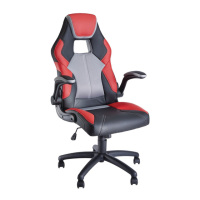

 To Next Page