EasyManua.ls Logo

Xtrem Bots Andy XT380970 - User Manual

Xtrem Bots Andy XT380970
6 pages
Go to English
Print Icon
To Next Page IconTo Next Page
Loading...
Mój pierwszy programowalny robot
INSTRUKCJA OBSŁUGI. Strona 2.
INSTRUCTION MANUAL. Page 4.
PL
EN
Question and Answer IconNeed help?

Do you have a question about the Xtrem Bots Andy XT380970 and is the answer not in the manual?

Overview

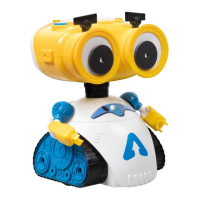
The device is a programmable robot named Andy, designed as "My first programmable robot" for children. It offers an interactive way to learn programming through play.

Function Description:

Andy is a programmable robot with three main play modes: Free Play, Programming, and Dance.

  • Free Play: This is the robot's default mode when switched on. In this mode, pressing any button triggers an automatic action. Andy emits a joyful sound when the pause button is pressed.
  • Programming: This mode allows users to program a sequence of movements for Andy. Users press the GO button once to enter programming mode. They can then program any of the four directional movements (left, right, forward, back) and the pause button. During programming, pressing the pause button makes Andy stop and emit a happy sound. Once programming is complete, pressing the GO button again makes Andy perform the programmed movements. If a mistake is made or the user wishes to cancel programming, pressing the X button clears the memory.
  • Dance: By pressing the GO button three times in a row, Andy will enter dance mode and move to music.
  • Game: Andy and His Friends: This game involves using included cards to find Andy's 27 friends. There are three types of cards: Head, Body, and Legs. To play, a card is picked face down from each deck and placed on the floor to create a challenge. Other cards are used to calculate distances, with each card representing 15 cm of movement. Andy is placed in the center of the first card, and the robot's distance switch is set to 15 cm. Users then press GO and program the required movements, pressing the pause button when Andy is on top of a card. Pressing GO again makes Andy execute the programmed route. The difficulty of programming increases with greater distances between cards and more rotations. Users can track which friends they've found on the last page of the booklet. Additional game themes can be downloaded and printed from the manufacturer's website.

Important Technical Specifications:

  • Power Supply: 4.5V DC
  • Battery Type: 3 x 1.5V AA/LR6 batteries (not included).
  • Movement Distance: The robot can be set to move 15 cm or 30 cm per step.
  • Age Recommendation: Not suitable for children under 3 years of age due to small parts that could cause choking.

Usage Features:

  • Buttons:
    • Directional Buttons (Four-way movements): Control Andy's movement in four directions (forward, backward, left, right).
    • Stop (X button): Stops Andy from performing any current action and clears programmed memory in programming mode.
    • Pause (II button): Makes Andy stop for a moment and emit a joyful sound. Can be programmed as a step in programming mode.
    • GO button: Used to switch between modes (Free Play, Programming, Dance) and to initiate programmed actions.
  • Battery Installation: Requires opening the battery compartment lid with a screwdriver, inserting 3 AA 1.5V batteries with correct polarity, and then closing the lid with the screw.
  • Play Distance Selection: A switch allows users to choose between 15 cm and 30 cm movement distances for the robot.
  • Safety Warnings:
    • Do not pick up the vehicle when it is performing.
    • Keep hands, hair, and clothing away from the tires when the switch is ON.
    • Avoid hitting people, animals, and household furniture.
    • The toy should be used under adult supervision.
    • Colors and specifications may vary from photos and illustrations.

Maintenance Features:

  • Battery Replacement: Change batteries when the device's power is low.
  • Battery Removal: Always remove batteries from the toy if it will not be used for a long period.
  • Inspection: Regularly check the plug and other parts for damage. If damaged, do not use the product until it has been repaired.
  • Cleaning: Gently wipe the toy with a clean cloth.
  • Heat and Water: Keep the toy away from direct heat sources. Do not submerge the toy in water, as this can damage the electronic components.
  • Battery Handling:
    • Non-rechargeable batteries are not to be recharged.
    • Rechargeable batteries must be removed from the toy before charging and should only be charged under adult supervision.
    • Only batteries of the same or equivalent type as recommended should be used.
    • Batteries must be inserted with correct polarity.
    • Exhausted batteries must be removed from the toy.
    • The supply terminals are not to be short-circuited.
    • Do not mix old and new batteries.
    • Do not mix alkaline, standard (carbon-zinc), or rechargeable (nickel-cadmium) batteries.
  • Disposal: Batteries, rechargeable batteries, button cells, and battery packs must not be disposed of with household waste. They contain substances harmful to the environment and health. When the toy is out of use, the built-in rechargeable battery should be removed by breaking the product, or replaceable batteries should be removed by unscrewing the battery compartment door. Dispose of batteries according to local recycling laws. Electrical appliances should be taken to local collection points for waste electrical and electronic equipment (WEEE). Other components can be disposed of in domestic refuse.

Xtrem Bots Andy XT380970 Specifications

General IconGeneral
BrandXtrem Bots
ModelAndy XT380970
CategoryToy
LanguageEnglish

Related product manuals