5
ENGLISH
3 PLAY MODES
FREE PLAY:
This is the robot’s default mode when switched on. When any button is pressed, this is the automatic action. Andy lets
out a sound of joy when the pause button is pressed.
PROGRAMMING:
Press the button once. Enter the programming in order. All four directions (left, right, forward, and back) and the
button can be programmed. During programming, with the button, Andy stops and lets out a happy sound.
When programming is complete, press the button again. Andy will perform the programmed movements.
If you wish to cancel during programming or you have made a mistake, press the button to clear the memory.
DANCE:
Press the button 3 times in a row and Andy dances to the music.
EN
GAME: ANDY AND HIS FRIENDS
OTHER GAME THEMES
Diculty:
The programming
diculty increases
as the distance
between tiles
increases and as the
number of rotations
increases.
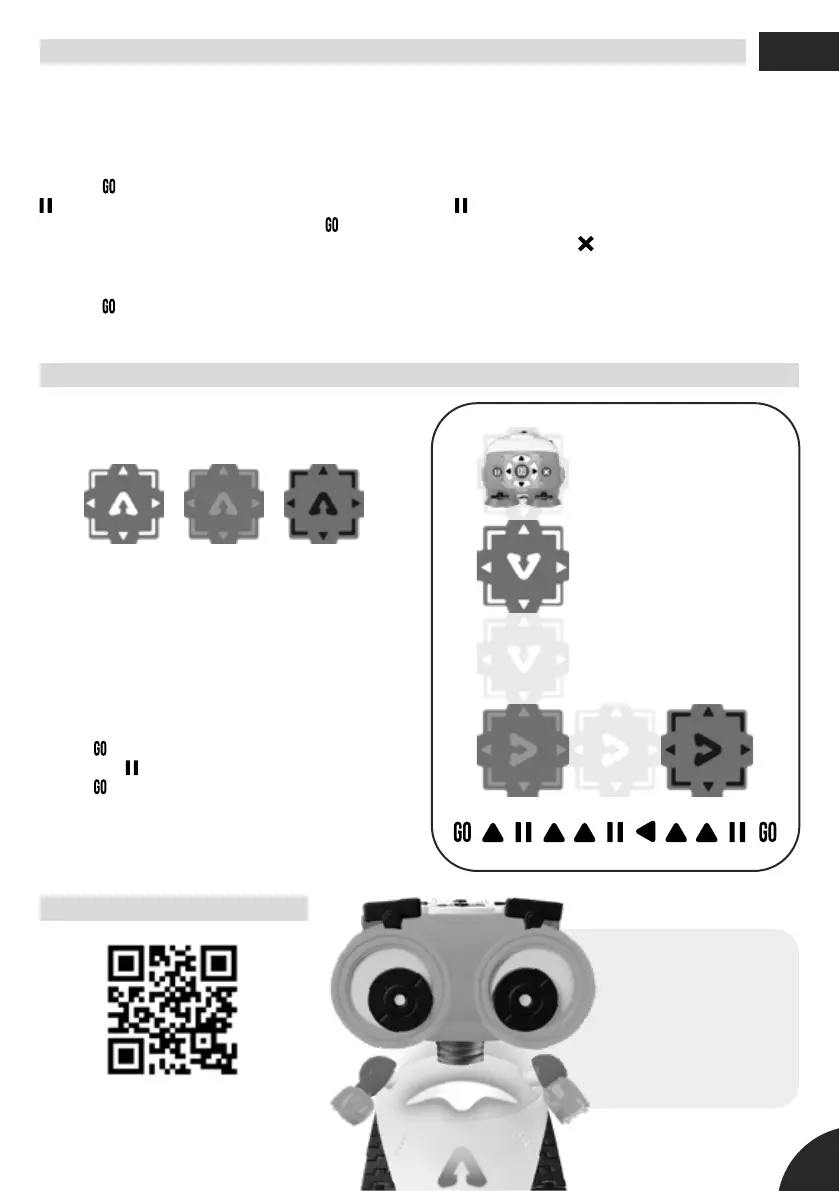
Play with the cards included to nd Andy’s 27 friends.
There are three types of cards:
1. Pick a card face down from each deck and place
them on the oor to create a challenge.
2. Using the other cards, calculate the distances to
make them as accurate as possible. Each card is equal
to the distance Andy travels in each move: 15 cm. Use
another card as a rst card.
3. Place Andy in the centre of the rst card to start, and
set the switch to the 15 cm setting.
4. Press
and then program the required movements.
Program the button when you are on top of a card.
5. Press again to see what route it takes.
6. See which of Andy’s friends you have found on the
last page of this booklet. If you want, you can highlight
them so you don’t repeat the same ones and so you
can nd them all.
Head Body Legs
Download and print other game
themes on our website:
www.xtrembots.com/andy
Hello!
I’m Andy, and together
we’re going to go on
lots of adventures
while learning how to
program. Time to play!


 To Next Page