(C) Product Descriptions
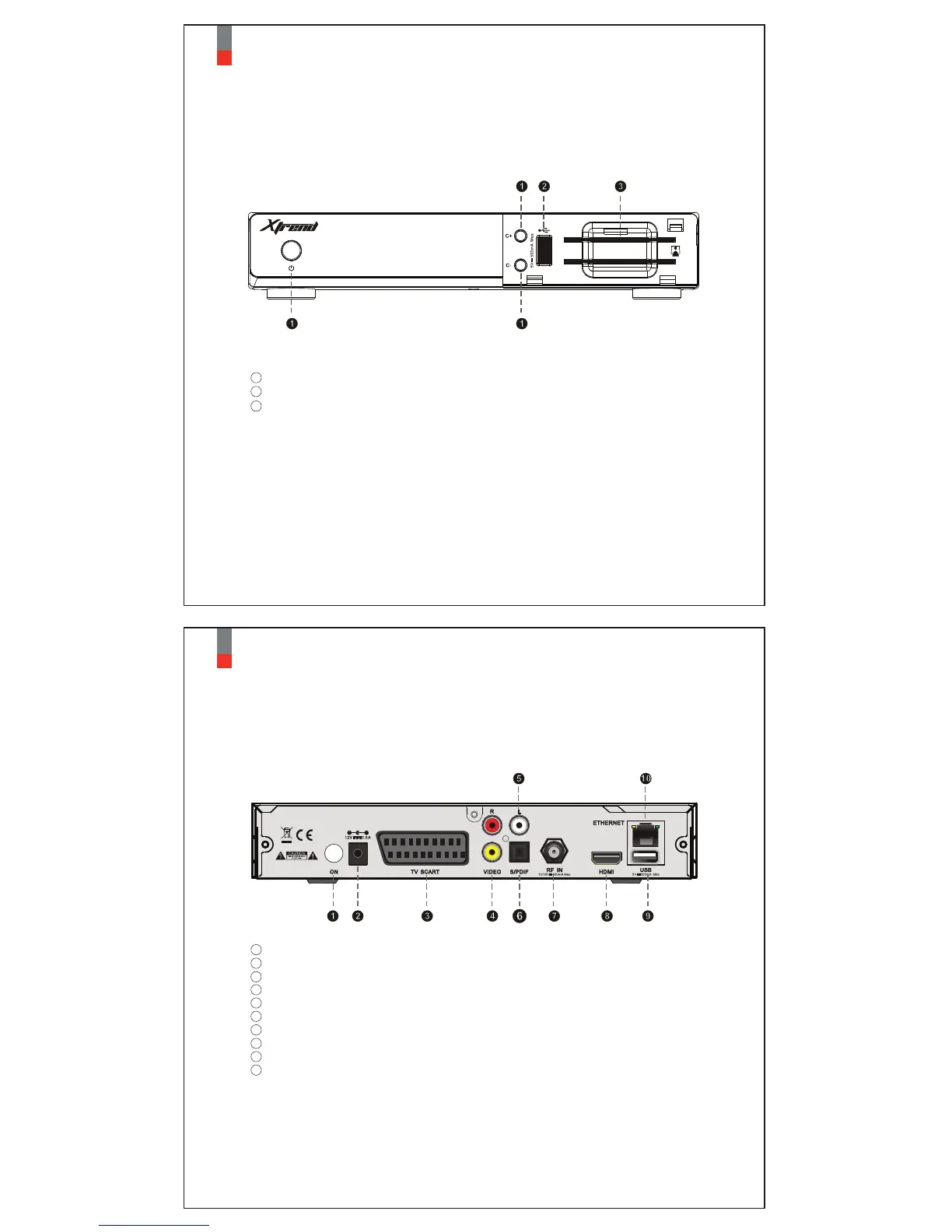
Buttons : Standby/Channel+/Channel-
USB : Connects to the USB memory stick or external HDD
Smartcard reader slot : Two Smartcard slots are provided
Front Panel
04
Xtrend ET4000
1
2
3
05
Xtrend ET4000
LNB-IN : One satellite cable can be connected.
HDMI : Connects to TV using a HDMI cable for both audio and video signals.
Ethernet : Connects the PC or another set top box of ET4000.
USB : Connects the USB memory stick or external HDD.
S/PDIF : Connects to a digital audio system using S/PDIF cable.
Video output : Connects to TV using RCA cable
Audio output : Connects to TV using RCA cable.
DC-IN: Connects the detachable D/C power adapter.
On : Control power on and off.
Rear Panel
7
TV SCART : Connects to TV using aSCART cable for both audio and video signals.
3
8
10
9
6
4
5
2
1


 To Next Page