QUICK START
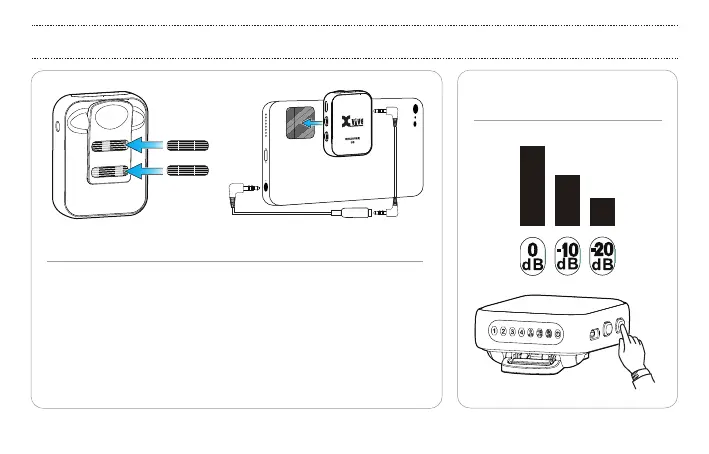
4.1 CONNECTING THE RECEIVER TO A SMARTPHONE
5. THREE OUTPUT
GAIN LEVELS
To connect to a smartphone with a TRRS 3.5 mm / 1/8” jack, plug one
end of the included stereo cable into the receiver, and the other end
into the TRS to TRRS adapter. Plug the adapter into the smartphone’s
headphone jack. If your smartphone has a USB-C or lightning connector,
you will need to purchase an additional adapter (TRRS to USB-C or TRRS
to lightning). You can use the hook+loop fastener adhesives to attach
the receiver to your smartphone or tripod/mount. Stick the hook pieces
on the Receiver, and the loop piece on your smartphone.
13


 To Next Page