EasyManua.ls Logo

Yaber Pro V7 - Auto 6 D Keystone Correction

Yaber Pro V7
27 pages
Print Icon
To Next Page IconTo Next Page
To Previous Page IconTo Previous Page
Loading...
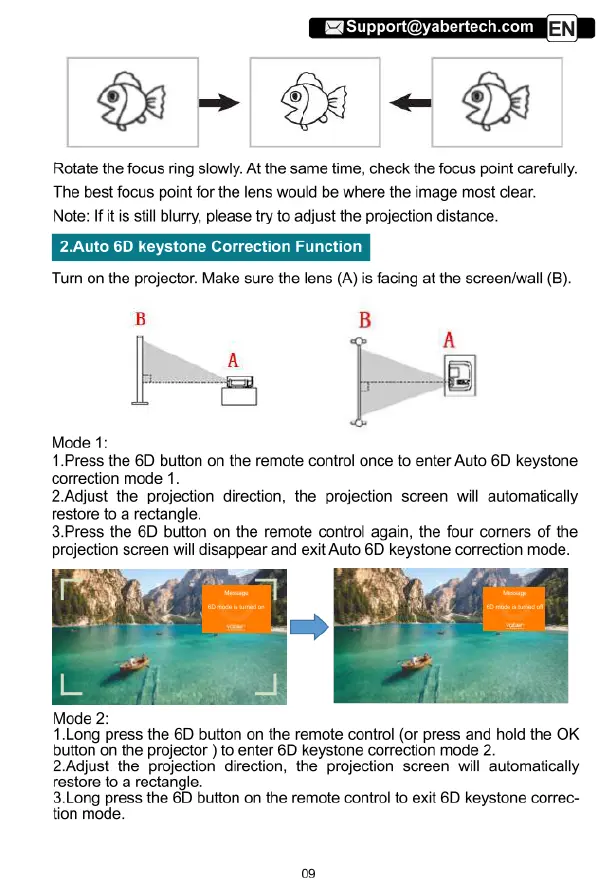
Rotate
the
focus
ring
slowly.
At
the
same
time,
check
the
focus
point
carefully.
The
best
focus
point
for
the
lens
would
be
where
the
image
most
clear.
Note:
If
it
is
still
blurry,
please
try
to
adjust
the
projection
distance.
uto
6D
keystone
Correction
Function
Turn
on
the
projector.
Make
sure
the
lens
(A)
is
facing
at
the
screen/wall
(B).
B
B
A
fl“
A
D
Mode
1:
1.Press
the
6D
button
on
the
remote
control
once
to
enter Auto
6D
keystone
correction
mode
1.
2.Adjust
the
projection
direction,
the
projection
screen
will
automatically
restore
to
a
rectangle.
3.Press
the
6D
button
on
the
remote
control
again,
the
four
corners
of
the
projection
screen
will
disappear
and
exit
Auto
6D
keystone
correction
mode.
Mode
2:
1.Long
press
the
6D
button
on
the
remote
control
(or
press
and
hold
the
OK
button
on
the
projector
)
to
enter
6D
keystone
correction
mode
2.
2.Adjust
the
projection
direction,
the
projection
screen
will
automatically
restore
to
a
rectangle.
avLongogress
the
6D
button
on
the
remote
control
to
exit
6D
keystone
correc-
tion
mode.

Related product manuals