EasyManua.ls Logo

Yaber Pro V7 - Projector Setup and Configuration; Select Input Signal Source

Yaber Pro V7
27 pages
Print Icon
To Next Page IconTo Next Page
To Previous Page IconTo Previous Page
Loading...
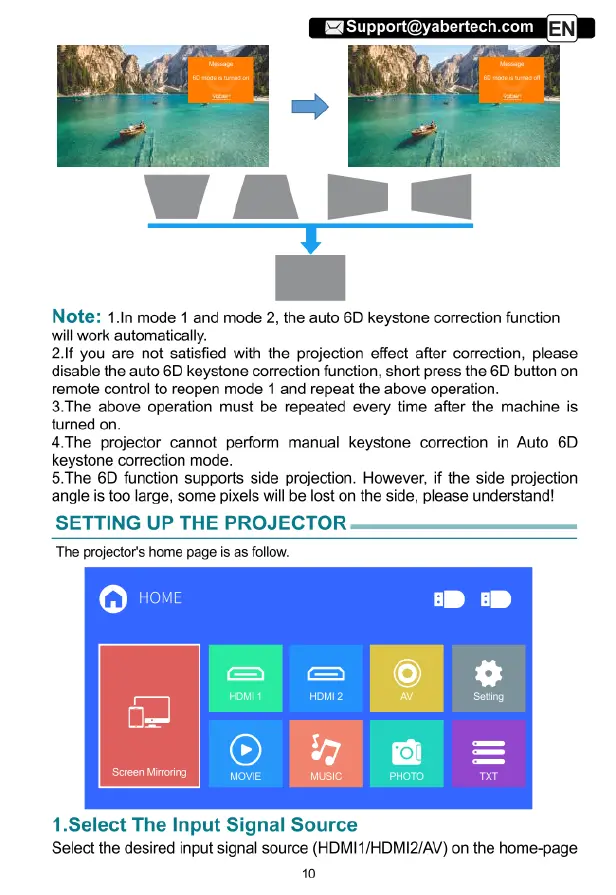
Note:
1.In
mode
1
and
mode
2,
the
auto
6D
keystone
correction
function
will
work
automatically.
2.If
you
are
not
satisfied
with
the
projection
effect
after
correction,
please
disable
the
auto
6D
keystone
correction
function,
short
press
the
6D
button
on
remote
control
to
reopen
mode
1
and
repeat
the
above
operation.
3.The
above
operation
must
be
repeated
every
time
after the
machine
is
turned
on.
4.The
projector
cannot
perform
manual
keystone
correction
in
Auto
6D
keystone
correction
mode.
5.The 6D
function
supports
side
projection.
However,
if
the
side
projection
angle
is
too
large,
some
pixels
will
be
lost
on
the side,
please
understand!
SETTING
UP
THE
PROJECTOR
The
projector's
home
page
is
as
follow.
)
o1
Screen
Mioring
nusic
1.Select
The
Input
Signal
Source
Select
the
desired
input
signal
source
(HDMI1/HDMI2/AV)
on
the
home-page
10

Related product manuals