EasyManua.ls Logo

Yaber Pro V7 - Page 16

Yaber Pro V7
27 pages
Print Icon
To Next Page IconTo Next Page
To Previous Page IconTo Previous Page
Loading...
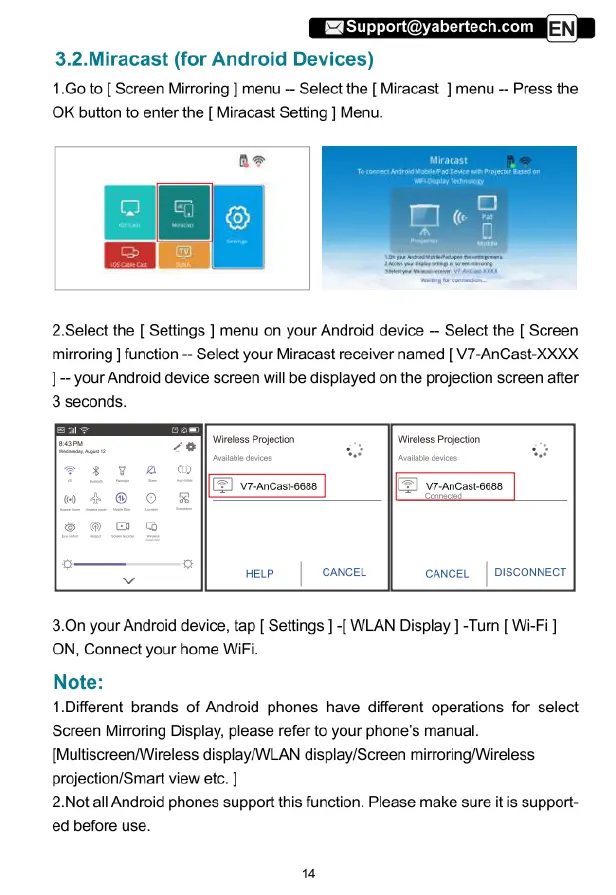
3.2.Miracast
(for
Android
Devices)
1.Go
to
[
Screen
Mirroring
]
menu
--
Select
the
[
Miracast
]
menu
-
Press
the
OK
button
to
enter
the
[
Miracast
Setting
]
Menu.
2.Select
the
[
Settings
]
menu
on
your
Android
device
-
Select
the
[
Screen
mirroring
]
function
-
Select
your
Miracast
receiver
named
[
V7-AnCast-XXXX
1--
your
Android
device
screen
will
be
displayed
on
the
projection
screen
after
3
seconds.
Wrless
Projecton
Wieless
Projocton
(5]
vrancastoces
[
yrncastesss
wewe
|
oanceL
CANCEL
|
DISCONNECT
3.0n
your
Android
device,
tap
[
Settings
]
-{
WLAN
Display
]
-Turn
[
Wi-Fi
]
ON,
Connect
your
home
WiFi.
Note:
1.Different
brands
of
Android
phones
have
different
operations
for
select
Screen
Mirroring
Display,
please
refer
to
your
phone's manual.
[Multiscreen/Wireless
display/WLAN
display/Screen
mirroring/Wireless
projection/Smart
view
etc.
]
2.Not
all
Android
phones
support
this
function.
Please
make
sure
it
is
support-
ed
before
use.

Related product manuals