EasyManua.ls Logo

Yaber Pro V7 - Page 17

Yaber Pro V7
27 pages
Print Icon
To Next Page IconTo Next Page
To Previous Page IconTo Previous Page
Loading...
Support@yabertech.com
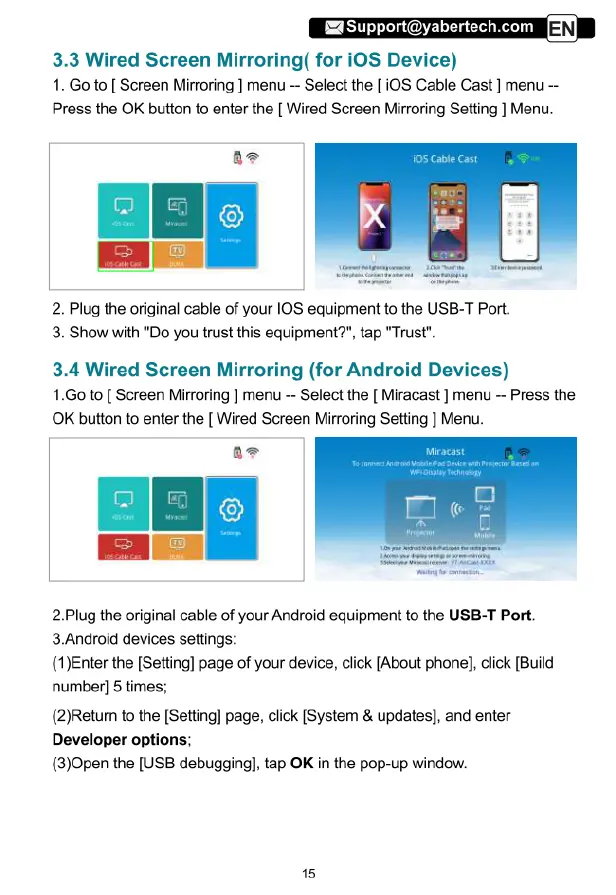
3.3
Wired
Screen
Mirroring(
for
iOS
Device)
1.
Go
to
[
Screen
Mirroring
]
menu
Select
the
[
iOS
Cable
Cast
]
menu
Press
the
OK
button
to
enter
the
[
Wired
Screen
Mirroring
Setting
]
Menu.
2.
Plug
the
original
cable
of
your
I0S
equipment
to
the
USB-T
Port.
3.
Show
with
"Do
you
trust
this
equipment?”,
tap
"Trust".
3.4
Wired
Screen
Mirroring
(for
Android
Devices)
1.Go
to
[
Screen
Mirroring
]
menu
--
Select
the
[
Miracast
]
menu
~
Press
the
OK
button
to
enter
the
[
Wired
Screen
Mirroring
Setting
]
Menu.
2Plug
the
original
cable
of
your
Android
equipment
to
the
USB-T
Port.
3.Android
devices
settings:
(1)Enter
the
[Setting]
page
of
your
device,
click
[About
phone],
click
[Build
number]
5
times;
(2)Return
to
the
[Setting]
page,
click
[System
&
updates],
and
enter
Developer
options;
(3)Open
the
[USB
debugging],
tap
OK
in
the
pop-up
window.

Related product manuals