EasyManua.ls Logo

Yaber Pro V7 - Projector Settings Menu; Picture Menu Configuration

Yaber Pro V7
27 pages
Print Icon
To Next Page IconTo Next Page
To Previous Page IconTo Previous Page
Loading...
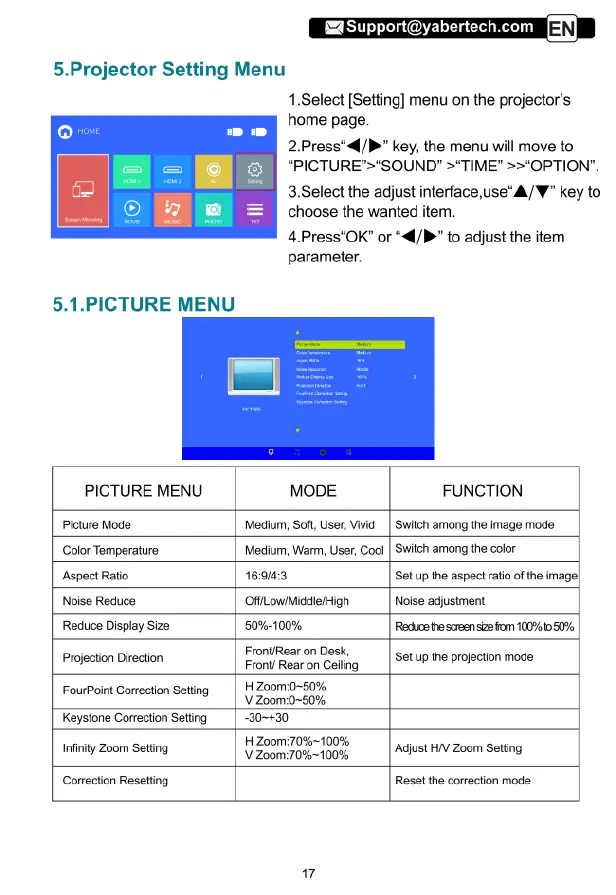
5.Projector
Setting
Menu
1.Select
[Setting]
menu
on
the
projector's
home
page.
2.Press"«4/P"
key,
the
menu
will
move
to
“PICTURE">*SOUND"
>TIME”
>>"OPTION".
3.Select
the
adjust
interface,use“A/¥"
key
to
choose
the
wanted
item.
4.Press"OK”
or
“4/P"
to
adjust
the
item
parameter.
5.1.PICTURE
MENU
PICTURE
MENU
MODE
FUNCTION
Picture
Mode
Medium,
Soft,
User,
Vivid
_|
Switch
among
the
image
mode
Color
Temperature
Medium,
Warm,
User,
Cool
|
Switch
among
the
color
Aspect
Ratio
16:9/4:3
Set
up
the
aspect
ratio
of
the
image|
Noise
Reduce
OffLow/Middle/High
Noise
adjustment
Reduce
Display
Size
50%-100%
Reduce
he
screen
size
from
100%
050%
Front/Rear
on
Desk,
Projection
Direction
Front
Rear
on
Gling
|
S8t
1P
the
projection
mode
FourPoint
Correction
Setting
|
H
Zoom:0~50%
V
Zoom:0-50%
Keystone
Correction
Setting
“30-+30
H
Zoom:70%~100%
Infinty
Zoom
Seting
V
Zoom:70%-~100%
Adjust
HV
Zoom
Setting
Correction
Resetting
Reset
the
correction
mode

Related product manuals