EasyManua.ls Logo

Yaber Pro V7 - Page 21

Yaber Pro V7
27 pages
Print Icon
To Next Page IconTo Next Page
To Previous Page IconTo Previous Page
Loading...
upport@yabertech.com
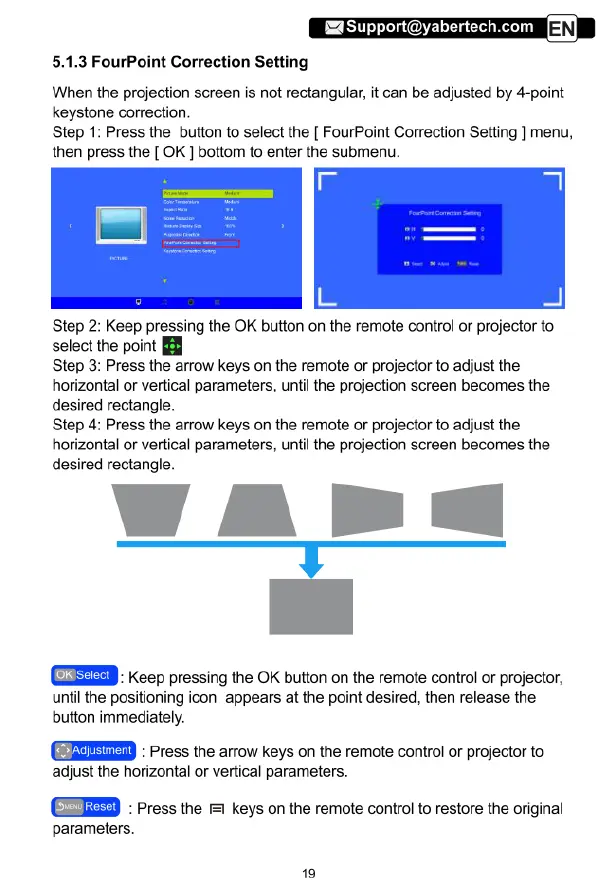
5.1.3
FourPoint
Correction
Setting
When
the
projection
screen
is
not
rectangular,
it
can
be
adjusted
by
4-point
keystone
correction.
Step
1:
Press
the
button
to
select
the
[
FourPoint
Correction
Setting
]
menu,
then
press
the
[
OK
]
bottom
to
enter
the
submenu.
Step
2:
Keep
pressing
the
OK
button
on
the
remote
control
or
projector
to
select
the
point
[
Step
3:
Press
the
arrow
keys
on
the
remote
or
projector
to
adjust
the
horizontal
or
vertical
parameters,
until
the
projection
screen
becomes
the
desired
rectangle.
Step
4:
Press
the
arrow
keys
on
the
remote
or
projector
to
adjust
the
horizontal
or
vertical
parameters,
until
the
projection
screen
becomes
the
desired
rectangle.
'.‘--
]
Keep
pressing
the
OK
button
on
the
remote
control
or
projector,
until
the
positioning
icon
appears
at
the
point
desired,
then
release
the
button
immediately.
:
Press
the
arrow
keys
on
the
remote
control
or
projector
to
adjust
the
horizontal
or
vertical
parameters.
:
Press
the
1
keys
on
the
remote
control
to
restore
the
original
parameters.

Related product manuals