EasyManua.ls Logo

Yaber Pro V7 - Page 22

Yaber Pro V7
27 pages
Print Icon
To Next Page IconTo Next Page
To Previous Page IconTo Previous Page
Loading...
upport@yabertech.com
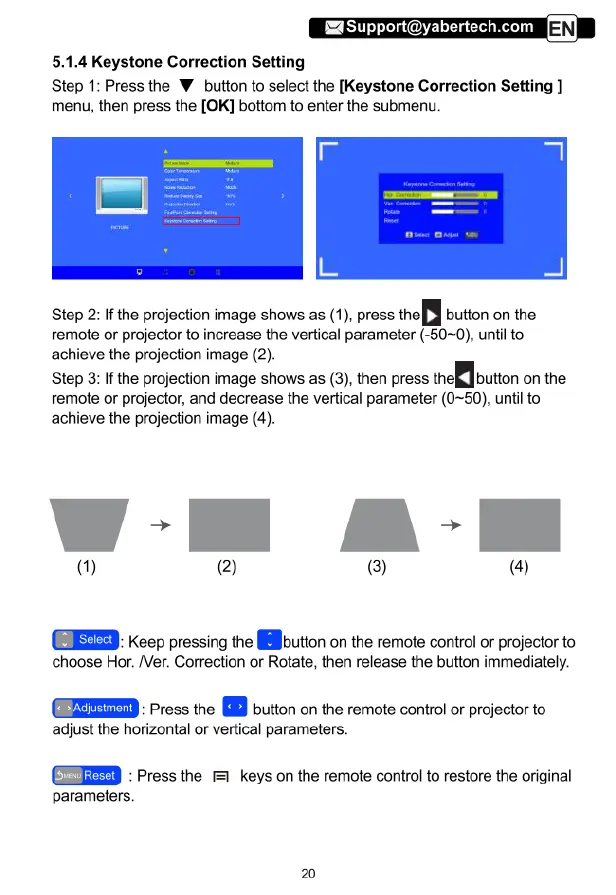
5.1.4
Keystone
Correction
Setting
Step
1:
Press
the
W
bution
to
select
the
[Keystone
Correction
Setting
]
menu,
then
press
the
[OK]
bottom
to
enter
the
submenu.
Step
2:
If
the
projection
image
shows
as
(1),
press.
Iheu
button
on
the
remote
or
projector
to
increase
the
vertical
parameter
(-50~0),
until
to
achieve
the
projection
image
(2).
Step
3:
If
the
projection
image
shows
as
(3),
then
press
(hen
button
on
the
remote
or
projector,
and
decrease
the
vertical
parameter
(0~50),
until
to
achieve
the
projection
image
(4).
W-lH
A-I
(1) (2)
@) @)
Keep
pressing
the
-butlon
on
the
remote
control
or
projector
to
choose
Hor.
/Ver.
Correction
or
Rotate,
then
release
the
button
immediately.
(ZZEEED
:
Press
the
[
button
on
the
remote
control
or
projector
to
adjust
the
horizontal
or
vertical
parameters.
o,
:Pressthe
=
keys
on
the
remote
control
to
restore
the
original
parameters.
20

Related product manuals