EasyManua.ls Logo

Yaber Pro V7 - Signal Line Connections; Connect USB Disk for Playback; Connect Devices via HDMI

Yaber Pro V7
27 pages
Print Icon
To Next Page IconTo Next Page
To Previous Page IconTo Previous Page
Loading...
=4
Support@yabertech.com
@
System
Settings
Menu
MODE
FUNCTION
Language.
Engish,
France,
tallan,
Spanish
etc
5%
7
e
mg;:g;
gmfifl
in
Local
Update
Please
press
OK
e
Online
Update
Please
press
OK.
[Online
update
screen
mirroring
lsystem
seting
Software
Version
Restore
Factory
Defaut
[Please
press
OK
SIGNAL
LINES
CONNECTION
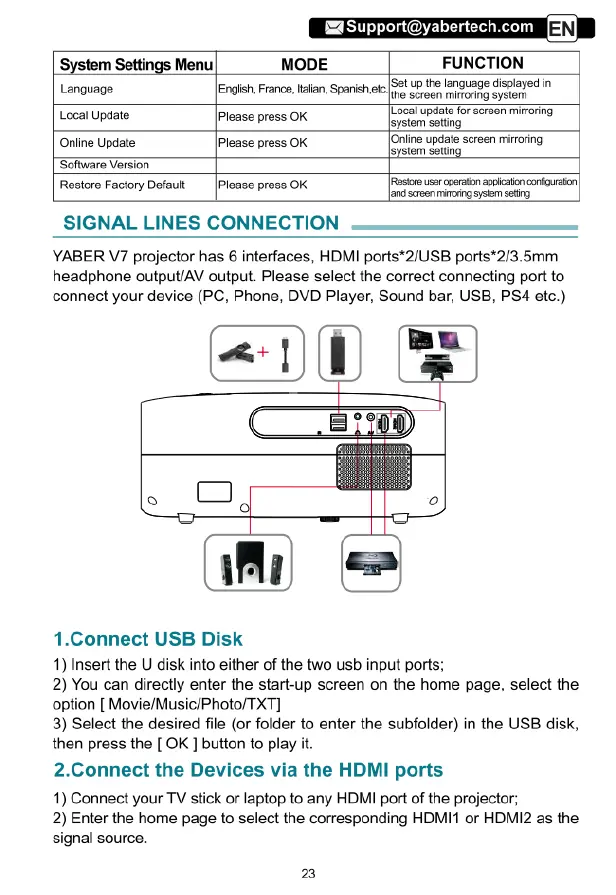
YABER
V7
projector
has
6
interfaces,
HDMI
ports*2/USB
ports*2/3.5mm
headphone
output/AV
output.
Please
select
the
correct
connecting
port
to
connect
your
device
(PC,
Phone,
DVD
Player,
Sound
bar,
USB,
PS4
etc.)
[Rosios
use
operaton
appicaton
corfguraton
Jandscreen
mitong
system
seting
1.Connect
USB
Disk
1)
Insert
the
U
disk
into
either
of
the
two
usb
input
ports;
2)
You
can
directly
enter
the
start-up
screen
on
the
home
page,
select
the
option
[
Movie/Music/Photo/TXT]
3)
Select
the
desired
file
(or
folder
to
enter
the
subfolder)
in
the
USB
disk,
then
press
the
[
OK
]
button
to
play
it.
2.Connect
the
Devices
via
the
HDMI
ports
1)
Connect
your
TV
stick
or
laptop
to
any
HDMI
port
of
the
projector;
2)
Enter
the
home
page
to
select
the
corresponding
HDMI1
or
HDMI2
as
the
signal
source.
23

Related product manuals