EasyManua.ls Logo

Yaber Pro V7 - Safe Shutdown Procedure

Yaber Pro V7
27 pages
Print Icon
To Next Page IconTo Next Page
To Previous Page IconTo Previous Page
Loading...
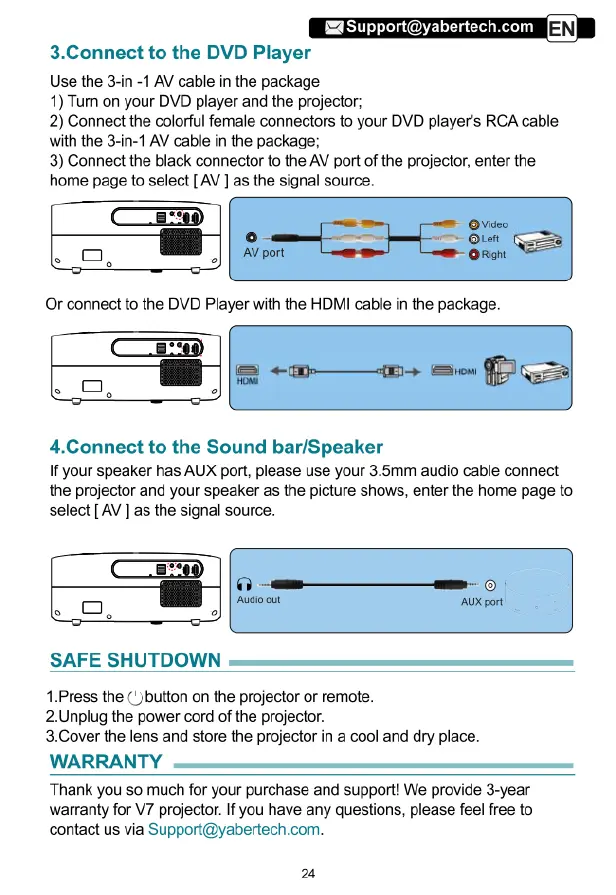
3.Connect
to
the
DVD
Player
Use
the
3-in
-1
AV
cable
in
the
package
1)
Tum
on
your
DVD
player
and
the
projector;
2)
Connect
the
colorful
female
connectors
to
your
DVD
player's
RCA
cable
with
the
3-in-1
AV
cable
in
the
package;
3)
Connect
the
black
connector
to
the
AV
port
of
the
projector,
enter
the
home
page
to
select
[AV
]
as
the
signal
source.
4.Connect
to
the
Sound
bar/Speaker
If
your
speaker
has
AUX
port,
please
use
your
3.5mm
audio cable
connect
the
projector
and
your
speaker
as
the
picture
shows,
enter
the
home
page
to
select
[AV
]
as
the
signal
source.
SAFE
SHUTDOWN
1.Press
the
(button
on
the
projector
or
remote.
2.Unplug
the
power
cord
of
the
projector.
3.Cover
the
lens
and
store
the
projector
in
a
cool
and
dry
place.
WARRANTY
Thank
you
so
much
for
your
purchase
and
support!
We
provide
3-year
warranty
for
V7
projector.
If
you
have
any
questions,
please
feel
free
to
contact
us
via
Support@yabertech.com.
24

Related product manuals