EasyManua.ls Logo

Yaber U10 - Page 6

Yaber U10
31 pages
Print Icon
To Next Page IconTo Next Page
To Previous Page IconTo Previous Page
Loading...
aftersales@yabertech.com!
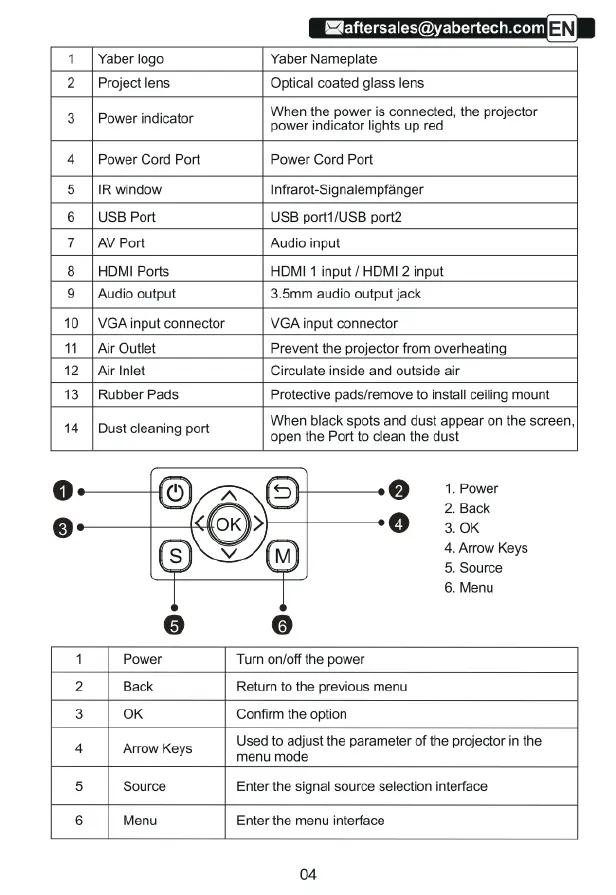
1
[Yaber
logo
Yaber
Nameplate
2
|Projectlens
Optical
coated
glass
lens
When
the
power
is
connected,
the
projector
3
|
Power
indicator
power
indicator
lights
up red
4
|
Power
Cord
Port
Power
Cord
Port
5
[IRwindow
Infrarot-Signalempfanger
6
|UsBPort
USB
port1/USB
port2
7
[AvPort
Audio
input
8
|HDMI
Ports
HOMI
1
input
/
HDMI
2
input
9|
Audio
output
3.5mm
audio
output
jack
10
|
VGAinput
connector
|
VGA
input
connector
11_|Air
Outiet
Prevent
the
projector from
overheating
12|
A
nlet
Circulate
inside
and outside
air
13|
Rubber
Pads
Protective
pads/remove
to
nstal
ceiing
mount
When
black
spots
and
dust
appear
on the
screen,
14
|
Dust
cleaning
port
open
the
Port
to
clean
the
dust
1.
Power
2.
Back
3.0k
4.
Arow
Keys
5.
Source
6.
Menu
1|
Power
“Tum
onloff
the
power
2
|
Back
Retumn
to
the
previous
menu
3
|
ok
Confirm
the
option
4|
Amowkeys
Used
to
adjust
the
parameter
of
the
projector
in
the
menu
mode
5
|
Source
Enter
the
signal
source
selection
interface
6
|
Menu
Enter
the
menu
interface
04

Related product manuals