EasyManua.ls Logo

Yaber U10 - Remote Control Operations; Detailed Remote Control Button Operations

Yaber U10
31 pages
Print Icon
To Next Page IconTo Next Page
To Previous Page IconTo Previous Page
Loading...
ftersales@yabertech.com
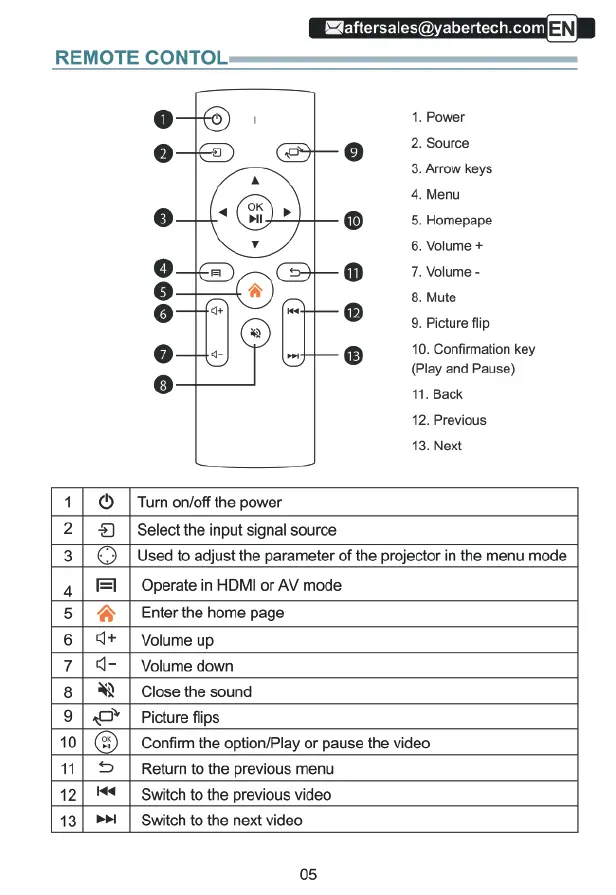
REMOTE
CONTOL.
00—
1.
Power
&
e
2.
Source
3.
Arrow
keys
4.
Menu
5.
Homepape
6.
Volume
+
7.
Volume
-
8.
Mute
9.
Picture
flip
10.
Confirmation
key
(Play
and
Pause)
11.
Back
12.
Previous
13.
Next
@
|
Turn
on/off
the
power
1
2|
&)
|
Select
the
input
signal
source
3
|
©
[Used
to
adjust
the
parameter
of
the
projector
in
the
menu mode
=1
|
Operate
in
HDMI
or
AV
mode
A
|
Enter
the
home
page
-
|
Volume
down
4
5
6
|
<+
|
Volume
up
7
8 |
N
|
Close
the
sound
9
|
O
|
Picture
flips
Return
to
the
previous
menu
Switch
to
the
previous
video
10
Confirm
the
option/Play
or
pause
the
video
B
et
»»
Switch
to
the
next
video
05

Related product manuals