EasyManua.ls Logo

Yaber U2 - Projection Mounting Options

Yaber U2
27 pages
Print Icon
To Next Page IconTo Next Page
To Previous Page IconTo Previous Page
Loading...
<ZOOM
Function>
When
playing
an
image
or
video,
if
you
want
to
reduce
the
size
of
the
projected
image
or
video,
you
can
use
the
remote
control
to
select
the
ZOOM
to
adjust
the
projection
size:
You
can
reduce
the
height
and width
of
original
size
up
to
25%.
Network
Mirror
(projection
mode)
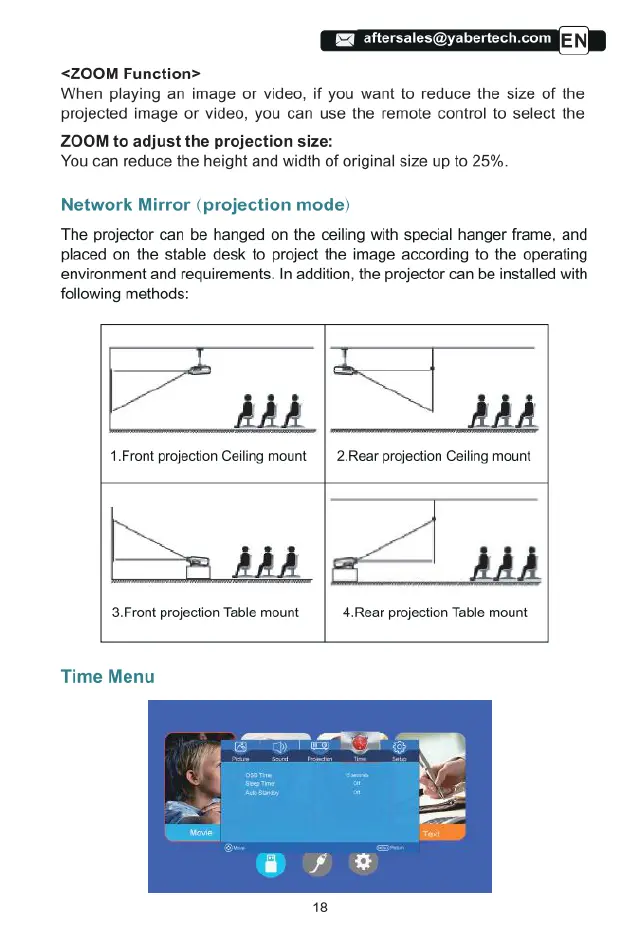
The
projector
can
be
hanged
on
the
ceiling
with
special
hanger
frame,
and
placed
on
the
stable
desk
to
project
the
image
according
to
the
operating
environment
and
requirements.
In
addition,
the
projector
can
be
installed with
following
methods:
.77}
AdA
1.Front
projection
Ceiling
mount
|
2.Rear
projection
Ceiling
mount
%m
AdA
3.Front
projection
Table
mount
4.Rear
projection
Table
mount
Time
Menu

Related product manuals