EasyManua.ls Logo

Yaber U5 - IMAGE ADJUSTMENT; 1. Keystone Correction; 2. Focus Adjustment

Yaber U5
31 pages
Print Icon
To Next Page IconTo Next Page
To Previous Page IconTo Previous Page
Loading...
A
aftersale:
yabertech.com
IMAGE
ADJUSTMENT.
When
using
the
projector
for
the
first
time,
it
normally
displays
an
unclear
image.
This
is
due
to
the
lens
being
out
of
focus
or
incorrect
trapezoid
setting.
Please
follow
the
below
steps
to
correct:
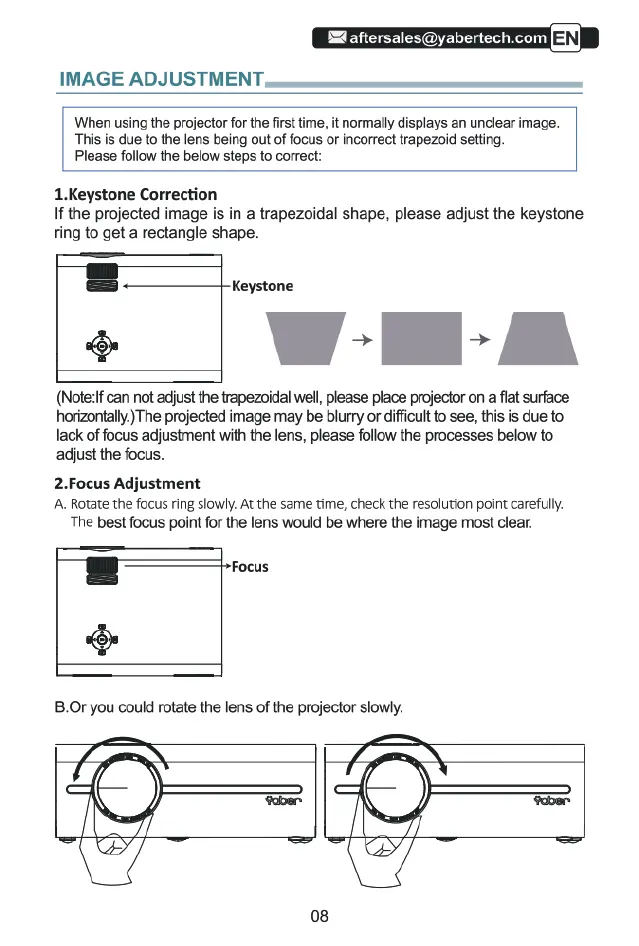
1.Keystone
Correction
If
the
projected
image
is in
a
trapezoidal
shape,
please
adjust
the
keystone
fing
to
get
a
rectangle
shape.
-
Keystone
+
W-l-A
(Note:ff
can
not
adjust
the
trapezoidal
well,
please
place
projector
on
a fiat
surface
horizontally
The
projected
image
may
be
blurry
or
difficult
to
see,
this
is
due
to
lack
of
focus
adjustment
with
the
lens,
please
follow
the
processes
below
to
adjust
the
focus.
2.Focus
Adjustment
A
Rotate
the
focus
ring
slowly.
At
the
same
time,
check
the
resolution
point
carefully.
The
best
focus
point
for
the
lens
would
be
where
the
image
most
clear.
B
a
B.0r
you could
rotate
the
lens
of
the
projector
siowly.
Focus
7
08