EasyManua.ls Logo

Yaber U5 - Step 2; 2.2 For Android Users; Method 1: Home Network Connection Mode; Step 1

Yaber U5
31 pages
Print Icon
To Next Page IconTo Next Page
To Previous Page IconTo Previous Page
Loading...
Note:
After
connecting,
if
"No
Internet
Connection”
is
displayed,
please
ignore
it
because
it
will
not
affect
the
use.
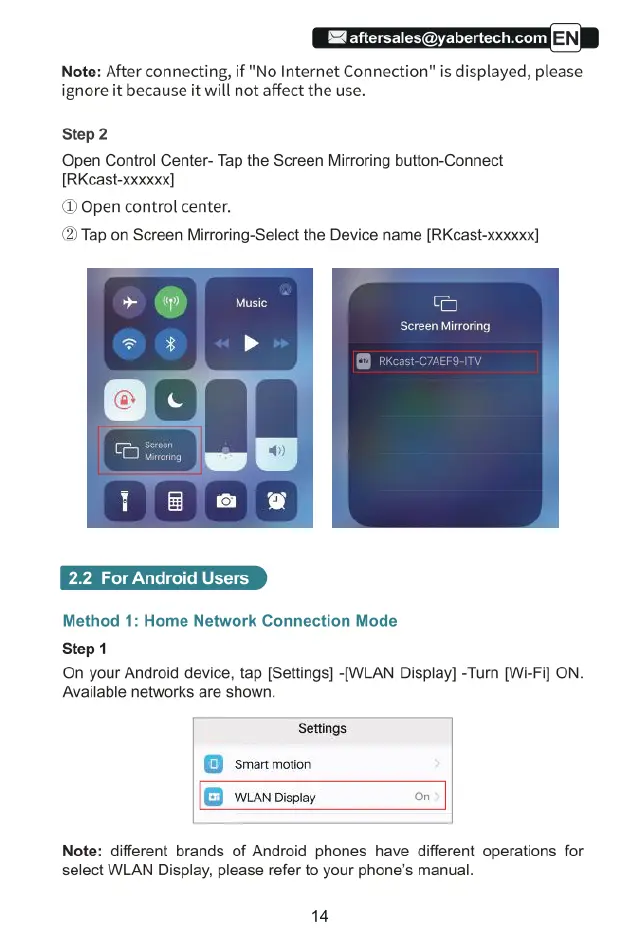
Step2
Open
Control
Center-
Tap
the
Screen
Mirroring
button-Connect
[RKcast-xooxxx]
(D
Open
control
center.
(2)
Tap
on
Screen
Mirroring-Select
the
Device
name
[RKcast-xxxxxx]
2.2
For
Android
Users
Method
1:
Home
Network
Connection
Mode
Step
1
On
your
Android
device,
tap
[Settings]
-[WLAN
Display]
-Tur
[Wi-Fi]
ON.
Available
networks
are
shown.
Settings.
‘Smart
motion
WLAN
Display
on
Note:
different
brands
of
Android
phones
have
different
operations
for
select
WLAN
Display,
please
refer
to
your
phone’s manual.
14