EasyManua.ls Logo

Yaber U5 - Step 3; Method 2: Cellular Network Connection Mode(From your mobile phone card); Step 1

Yaber U5
31 pages
Print Icon
To Next Page IconTo Next Page
To Previous Page IconTo Previous Page
Loading...
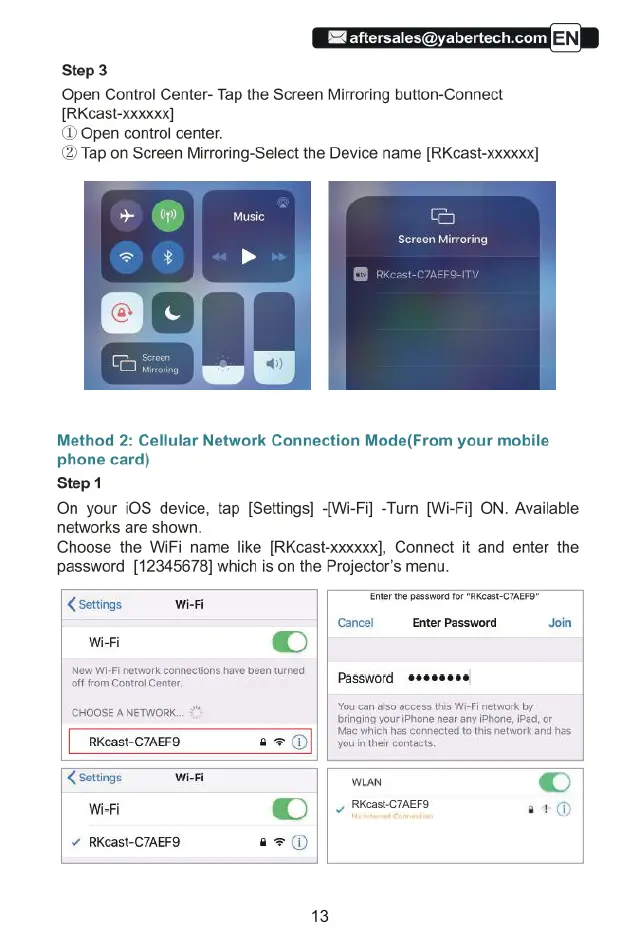
Step
3
Open
Control
Center-
Tap
the
Screen
Mirroring
button-Connect
[RKcast-xxo0]
(1)
Open
control
center.
(2)
Tap
on
Screen
Mirroring-Select
the
Device
name
[RKcast-xxxxxx]
Music.
Method
2:
Cellular
Network
Connection
Mode(From
your
mobile
phone
card)
Step
1
On
your
i0S device,
tap
[Settings]
[Wi-Fi]
-Turn
[Wi-Fi]
ON.
Available
networks
are
shown.
Choose
the
WiFi
name
like
[RKcast-xxxxxx],
Connect
it
and
enter
the
password
[12345678]
which
is
on
the
Projector’s
menu.
Ener
the
possword
for
‘RKeast
CIAEFO"
settings
wisi
Wi-Fi
[
@)
New
Wi-Fi
network
connections
have
been
turned
offfrom
Control
Center.
Password
&
Cancel
Enter
Password
Join
You
can
also
access
this
Wi-Fi
network
by
CHOGES
ANGIONS
bringing
your
iPhone
near
any
iPhone,
iPad,
or
Mitc
Which
has
conhected
1 tis
network
and
has
You
n
thekr
Gontacts,
settings
WiFi
R
©
WieFi
@
||
-
resomers
i
RKcast-C7AEF9
a=@®
13

Related product manuals