EasyManua.ls Logo

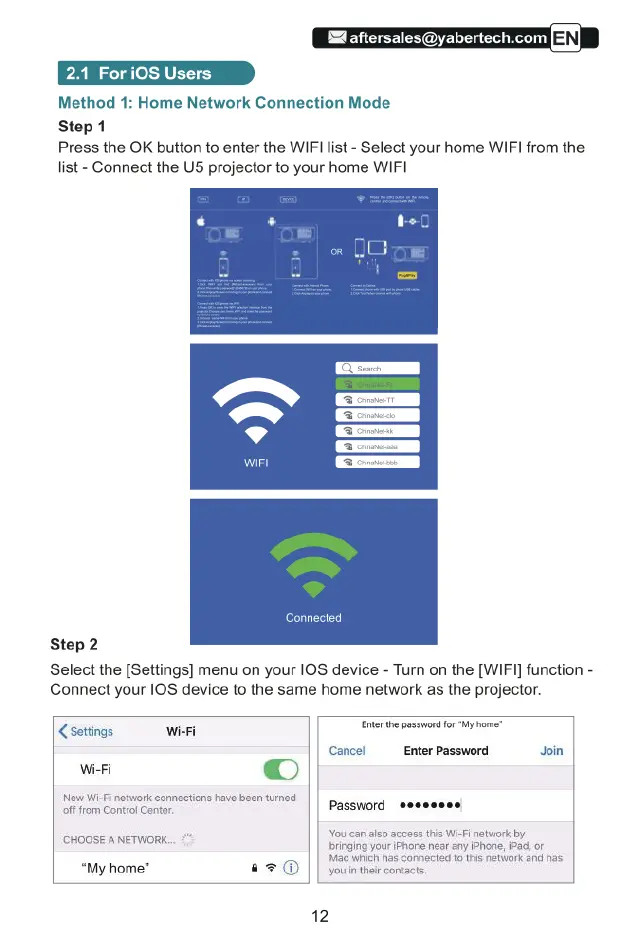
Yaber U5 - 2.1 For iOS Users; Method 1: Home Network Connection Mode; Step 1; Step 2

Yaber U5
31 pages
Print Icon
To Next Page IconTo Next Page
To Previous Page IconTo Previous Page
Loading...
A
aftersales@yabertech.com
2.1
ForiOS
Users
Method
1:
Home
Network
Connection
Mode
Step
1
Press
the
OK
button
to
enter
the
WIFI
list
-
Select
your
home
WIF| from
the
list
-
Connect
the
U5
projector
to
your
home
WIFI
WIFI
Connected
Step
2
Select
the
[Settings]
menu
on
your
10S device
-
Turn
on
the
[WIFI]
function
-
Connect
your
10S
device
to
the
same
home
network
as
the
projector.
Coattngs
R
Enter
the
password
for
My
home”
WiFi
[
@)
New
Wi-Fi
network connections
have
been
turned
off
from
Control
Centr.
Password
Cancel
Enter
Password
Join
You can
also
access
this
Wi-Fi
network
by
bringing
your
{Phone
near
any
IPhone,
iPad,
or
.
.
|||
Mag
whch
has
connected
to
tis
network
and has
My
home'
@%@
||
youintheir
contacts.
‘CHOOSE
A
NETWORK.
12

Related product manuals