EasyManua.ls Logo

Yaber U5 - 2. Wireless Projection Method; Warming Tips:

Yaber U5
31 pages
Print Icon
To Next Page IconTo Next Page
To Previous Page IconTo Previous Page
Loading...
I
aftersales@yabertech.com
2.Wireless
Projection
Method
A
Warming
Tips:
@
The
fluency
of
screen
mirroring
with
wireless
connection
will
be
affected
by
the
network
environment.
A
bandwidth
of
100Mbit
or
more
is
recom-
mended
when
using
screen
mirroring.
@
Make
sure
your
mobile device
is
close
to
the
projector
when
using
wireless
connection.
A
distance
within
1
meter
is
recommended.
®
Some
mobile
devices
may
not
support
screen
mirroring
due
to
the
compatibility.
@
Any
questions,
please
feel
free
to
contact
YABER
via
aftersales@yabertech.com
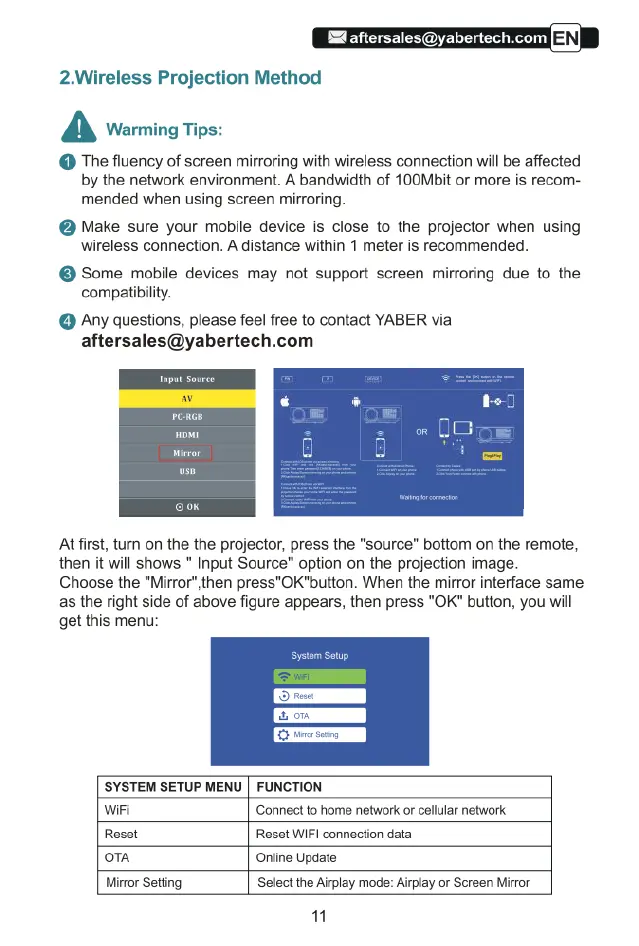
Atfirst,
tun
on
the the
projector,
press
the
"source”
bottom
on
the
remote,
then
it
will
shows
"
Input
Source"
option
on
the
projection
image.
Choose
the
"Mirror",then
press"OK"button.
When
the
mirror
interface
same
as
the
right
side
of
above
figure
appears,
then
press
"OK"
button,
you
will
get
this
menu:
%
on
SYSTEM
SETUP
MENU
|
FUNCTION
WiFi
‘Connect
to
home
network
or
cellular
network
Reset Reset
WIF|
connection
data
o1A
Online
Update
Mirror
Setting
Select
the
Airplay
mode:
Alrplay
or
Screen
Mirror
"

Related product manuals