EasyManua.ls Logo

Yaber U5 - Computer only; (Note: VGA connection can only transmit analog signal...; 2. Connecting to the DVD Player

Yaber U5
31 pages
Print Icon
To Next Page IconTo Next Page
To Previous Page IconTo Previous Page
Loading...
aftersales@yabertech.com
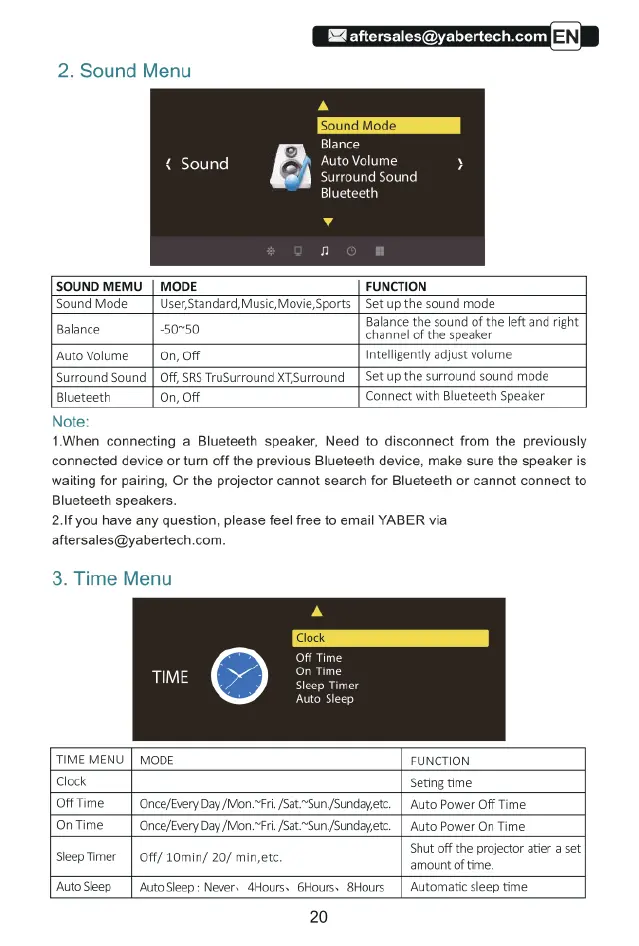
2.
Sound
Menu
Blance
{
Sound
S
Auto
Volume
8
surround
Sound
Blueteeth
SOUND
MEMU_|
MODE
FUNCTION
Sound
Mode
|
User,Standard,
Music,
Movie
Sports
|
Set
up
the
sound
mode
N
Balance
the
sound
of
the
left
and
right
Balance
50750
channel
of
the
speaker
Auto
Volume
|
on,
Off
Intelligently
adjust
volume
Surround
Sound
|
Off,
SRS
TruSurround
XT,Surround
|
Set
up
the
surround
sound
mode
Blueteeth
On,
Off
Connect
with
Blueteeth
Speaker
Note:
1When
connecting
a
Blueteeth
speaker,
Need
to
disconnect
from
the
previously
connected
device
or
turn
off
the
previous
Blueteeth
device,
make
sure
the
speaker
is
waiting
for
pairing, Or
the
projector
cannot
search
for
Blueteeth
or
cannot
connect
to
Blueteeth
speakers
2.If
you
have
any
question,
please
feel
free
to
email
YABER
via
aftersales@yabertech.com.
3.
Time
Menu
Off
Time.
On
Time
p
Time
Auto
Sleep
TIME
MENU
|
MODE
FUNCTION
Clock
Seting
time
Off
Time
|
Once/Every
Day
/Mon~Fri.fsat“Sun
/Sundayetc.
|
Auto
Power
O
Time
On
Time
|
Once/Every
Day
/Mon~Fri.fsat~“Sun
/Sundayetc.
|
Auto
Power
On
Time.
SleepTimer
|
Off/
10min/
20/
min,etc.
Shut
o
the
projector
atier
a
et
AutoSleep
|
AutoSieep:
Nevers
Hours:
GHours.
SHours
|
Automatic
sleep
fme
20

Related product manuals