EasyManua.ls Logo

Yaber V10 - USB Disk Media Playback

Yaber V10
25 pages
Print Icon
To Next Page IconTo Next Page
To Previous Page IconTo Previous Page
Loading...
2.USB
Disk
Input
Mode
2.1.Play
Movie/Music/Photo/Office
Suite
in
the
USB
Disk
Input
Mode
1).Input
the
USB
Disk,
select
[
Office Suite
]
on
the
homepage
and
enter;
2).Select
the
option
[
Movie/Music/Photo/Office
Suite]
3).Select
the
desired
file
(or
folder
to
enter
the
subfolder)
in
the
USB
disk,
then
press
the
[
OK
]
button
to
play
it.
use
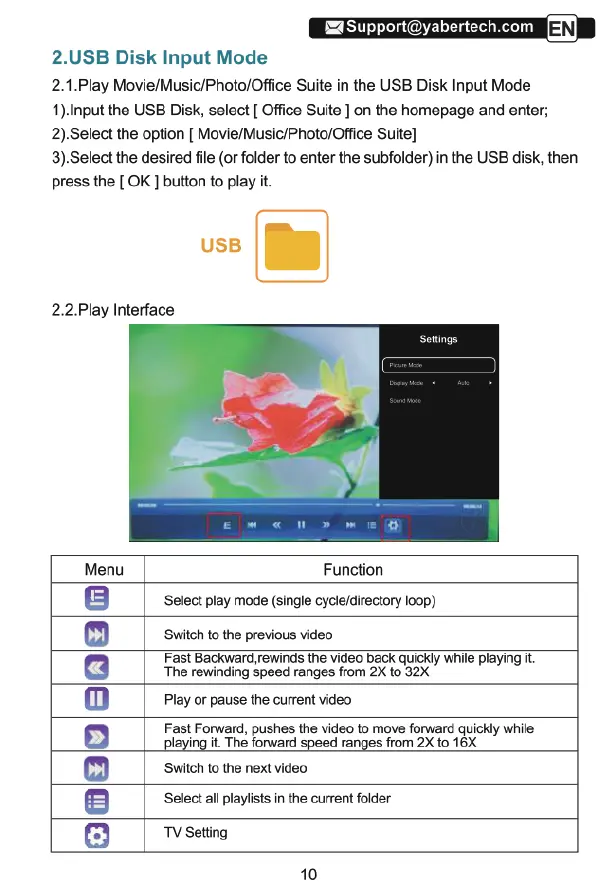
2.2.Play
Interface
Function
Select
play
mode
(single
cycle/directory
loop)
Switch
to
the
previous
video
Fast
Backward
rewinds
the
video
back
quicKly
while
piaying
it
The rewinding
Speed
ranges
from
2X
to
32X
Play
or
pause
the
current
video
Fast
Forward,
pushes
the
video
to
move
forward
quickly
while
playing
it.
The
forward
speed
ranges
from
2X
to
16X
Switch
to
the
next
video
Select
all
playists
in
the
current
folder
06900080
:
TV
Setting
10

Related product manuals