EasyManua.ls Logo

Yaber V10 - Wi-Fi Connection Setup

Yaber V10
25 pages
Print Icon
To Next Page IconTo Next Page
To Previous Page IconTo Previous Page
Loading...
upport@yabertech.com
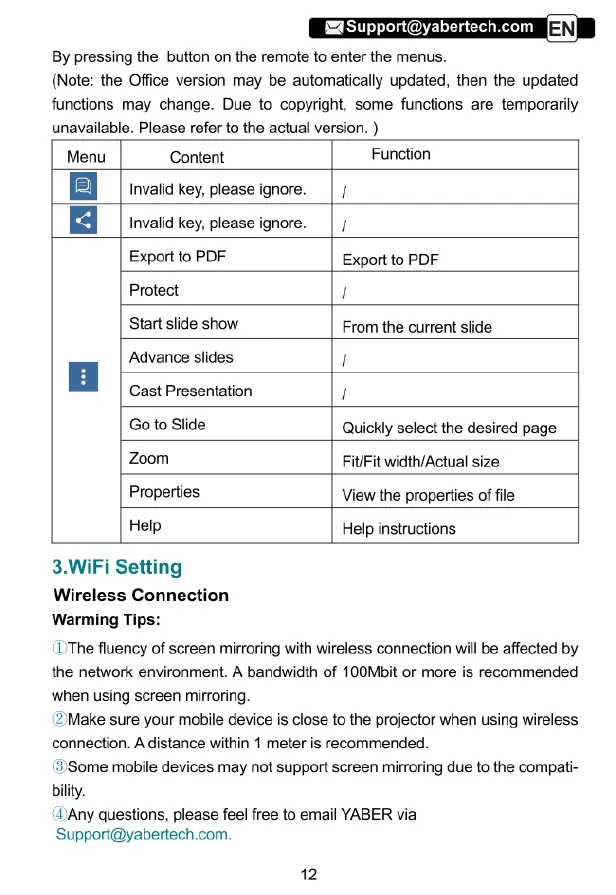
By
pressing
the
button
on
the
remote
to
enter
the
menus.
(Note:
the
Office
version
may
be
automatically
updated,
then
the
updated
functions
may
change.
Due
to
copyright,
some
functions
are
temporarily
unavailable.
Please
refer
to
the
actual
version.
)
Menu
Content
Function
Invalid
key,
please
ignore.
|
/
n
Invalid
key,
please
ignore.
|
/
Export
to
PDF
Export
to
PDF
Protect
!
Start slide
show
From
the
current
slide
Advance
slides
/
n
Cast
Presentation
/
Go
to
Slide
Quickly
select
the
desired
page
Zoom
Fit/Fit
width/Actual
size
Properties
View
the
properties
of
file
Help Help
instructions
3.WiFi
Setting
Wireless
Connection
Warming
Tips:
(1'The
fluency
of
screen
mirroring
with
wireless
connection
will
be
affected
by
the
network
environment.
A
bandwidth
of
100Mbit
or
more
is
recommended
when
using
screen
mirroring.
(2)Make
sure your
mobile device
is
close
to
the
projector
when
using
wireless
connection.
A
distance
within
1
meter
is
recommended.
(3)Some
mobile
devices
may
not
support
screen
mirroring
due
to
the
compati-
bility.
(1Any
questions,
please
feel
free
to
email
YABER
via
Support@yabertech.com.
12

Related product manuals