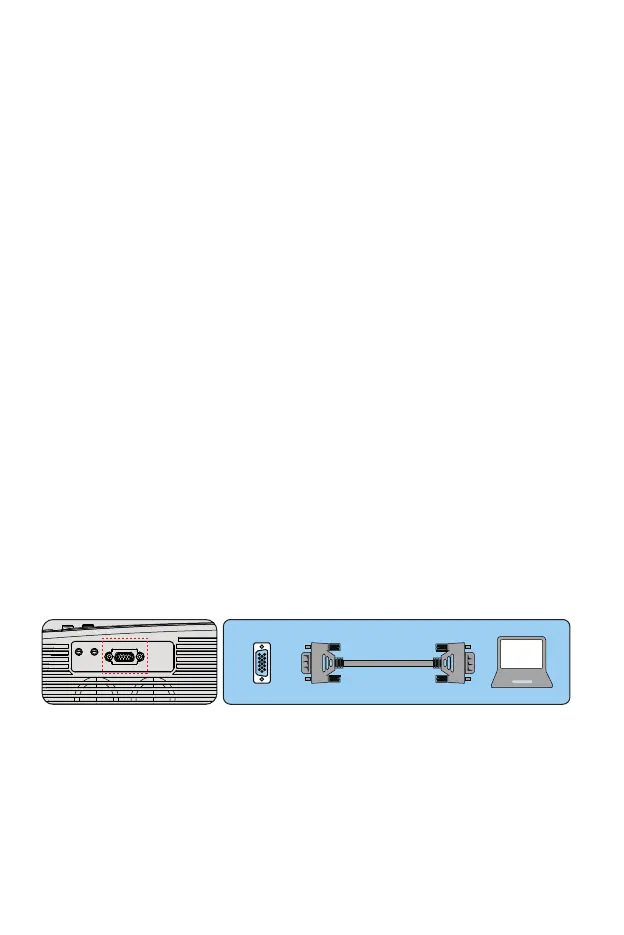
Connection device
4. The image works but there is no sound
①. Are the input cables connected correctly?
②. Volume at minimum or silent
③. Check that the audio format of the video is in the supported list
5. Turns off automatically after being turned on for a while
①. Is there a barrier around the fan?
②. Small or large voltage fluctuations
③. Check the overheating protection system
6. I can not find devices connected with hard drives or flash drives
①. Re-insert the device
②. Check if the device is working
7. Unable to play video
①. Is the video format correct?
②. The file is corrupted?
③. The device is damaged
1.Connecting a PC
1.Use the supplied VGA cable to connect the PC to the projector.
2. Turn on the projector and the computer.
* NOTE: You can also connect an HDMI cable, remember that VGA
connections do not transmit audio, so the sound will be output from the
computer. If you connect an HDMI cable, the audio will be output to the
projector.
2. Connecting a smartphone
Connect a phone with Android system:
(Note: check if your Android phone supports MHL function.) MHL-HDMI
cable not included)
1. Connect the projector and the Android smartphone with the MHL-HD-
MI cable.
2. Choose the signal source: "HDMI"
VGA
01 02 03 04 05 06 07
08 09 10 11 12 13 14 15 16 17
18 19 20 21 22 23 24 25 26 27
28 29 30 31 32 33 34 35 36 37
38 39 40 41 42 43 44 45 46 47
48 49 50 51 52
53
54 55 56 57
58 59 60 61 62 63 64 65 66 67
68 69 70 71 72 73 74 75 76
77 78 79 80 81 82 83 84 85 86
87 88



 To Next Page