85
Appendix
Assembling the Clavinova
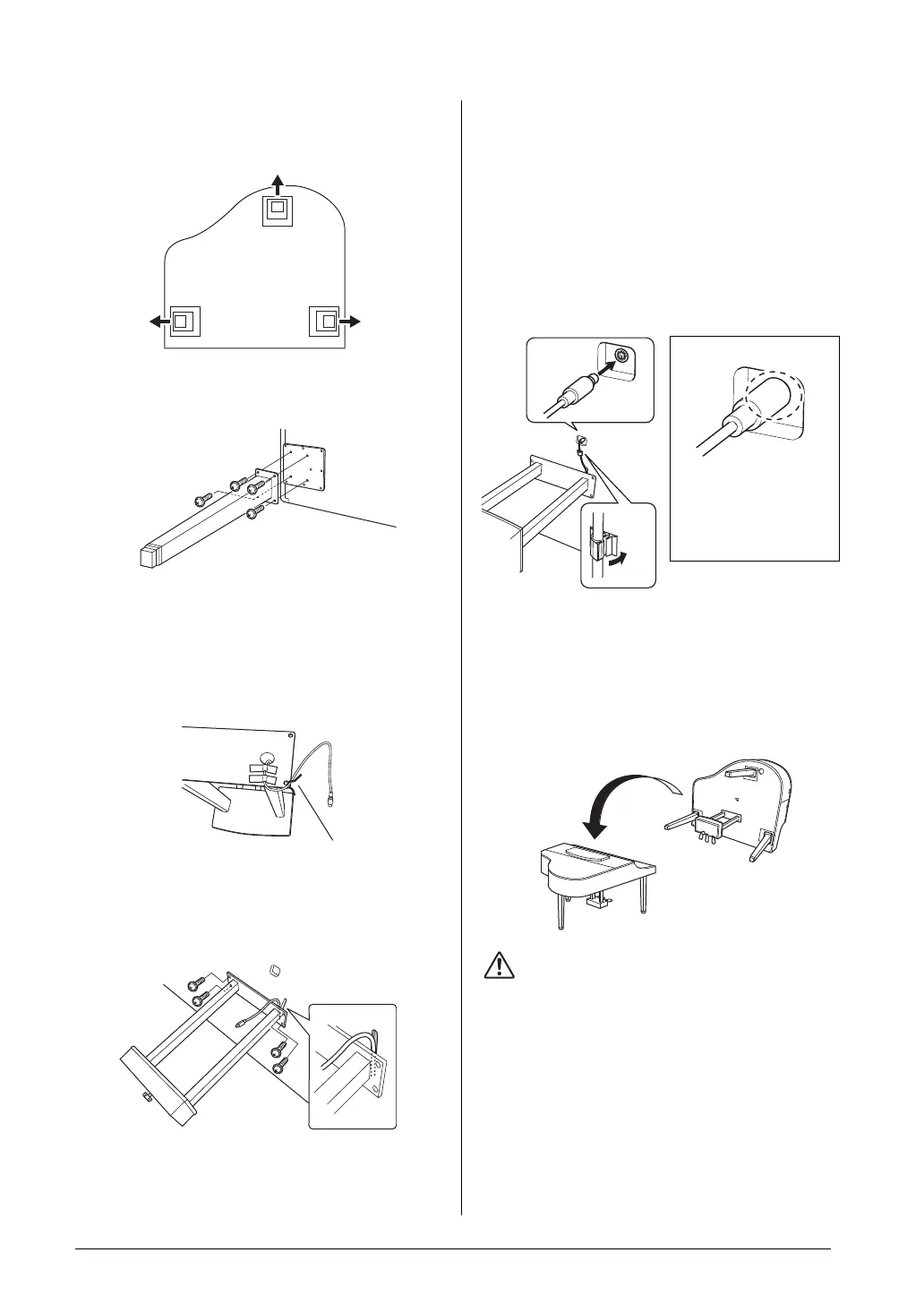
1. Attach two front legs and a rear leg.
Refer to the diagram below to verify the
orientation of the legs.
Install and tighten four 6 x 40 mm screws on
each leg, starting with one of the front legs.
2. Install the pedal box.
2-1 Remove the twist tie that affixes the pedal cord
to the upper portion of the pedal box
2-2 Align the cord with the groove on the unit, and
attach the pedal box using four 6 x 20 mm
screws.
2-3 Insert the pedal cord plug into the pedal
connector. Insert the plug so the arrow side
faces front (toward the keyboard).
If the plug will not go in easily, do not force it.
Double-check the orientation of the plug, then
try again.
2-4 Attach the cord holder on the unit as shown in
the illustration below, then use the cord holder
to affix the pedal cord.
3. Raising the unit to the standing
position.
Use the front legs as support to raise the unit.
CAUTION
Be careful not to pinch your fingers.
When you raise the unit, do not hold the key cover.
Rear leg
Front leg
Front leg
2-3
2-4
Insert the pedal cord
securely until the metal part
of the cord plug disappears
from view. Otherwise, the
pedal may not function



 To Next Page