DM7 Console Owner’s Manual
12
Rear Panel
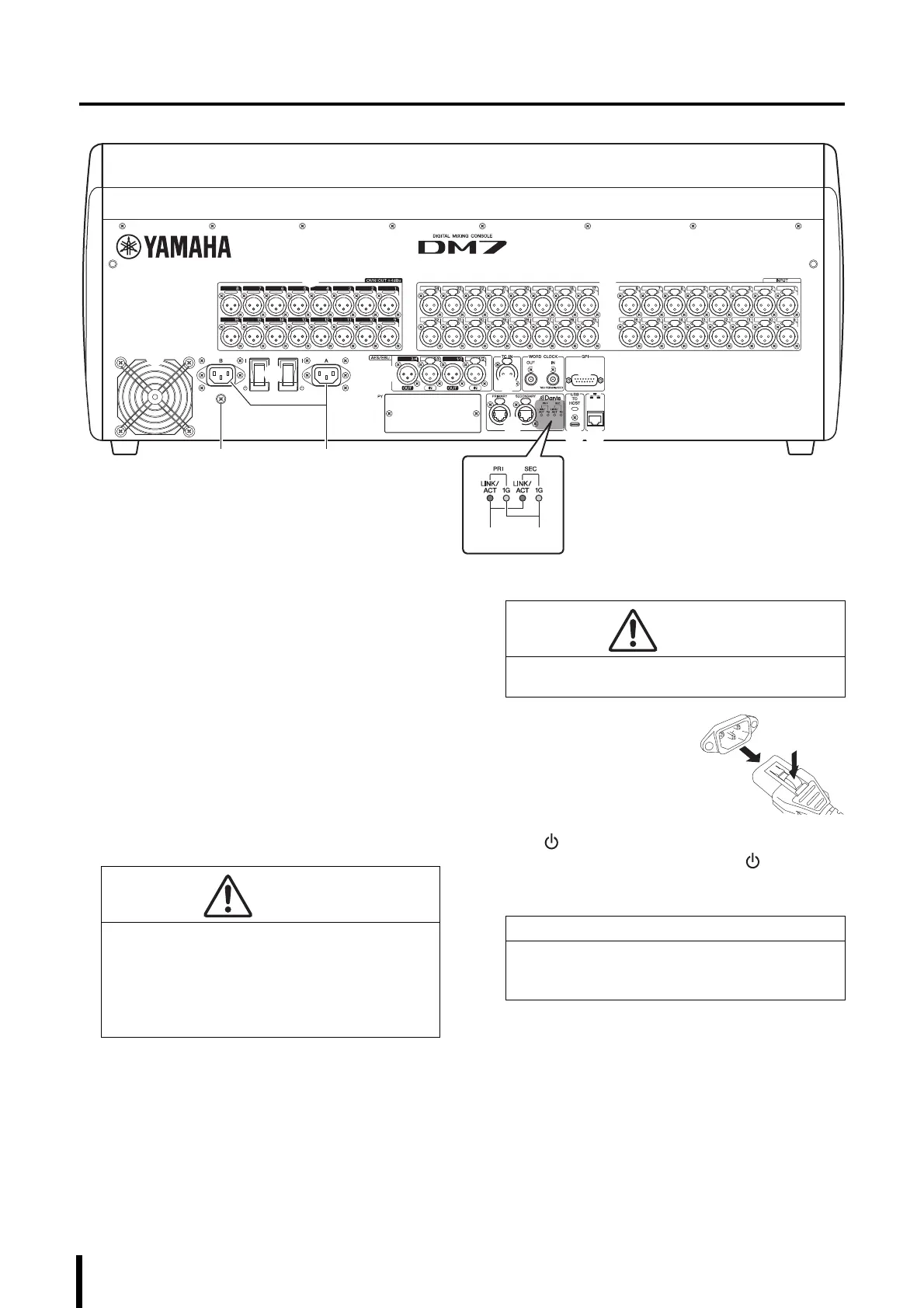
1 [OMNI OUT]
These are balanced XLR 3-pin chassis output
connectors that transmit analog audio signals.
2 [INPUT]
These are balanced XLR 3-hole chassis input
connectors for analog audio signals from line level
devices or microphones.
3 Cooling vent
This product is equipped with a cooling fan. This vent
lets warm air escape from the unit. Make sure that you
do not block the vent with any object. The air is taken in
through the ventilation ports at the rear and under the
front.
4 AC IN connectors [A]/[B]
Use these sockets to connect the supplied power cords.
First connect the AC power cords to this unit, and then
insert the power cord plugs into AC outlets.
Insert the power cord plugs all the way into the power
connectors until they lock in place securely. The
supplied AC power cords feature a V-lock mechanism
via a latch, which prevents the power cords from
disconnecting accidentally.
To disconnect each power
cord, remove it while pressing
the latch on the plug.
5 [ I ]/[ ] (Power switches)
Toggle between power on ( I ) and off ( ). If you plan
not to use the unit for a long period of time, remove the
power cords from the AC outlets.
NOTE
• This product will operate normally when one or both
power supplies [A] and [B] are both on.
• If both power supplies are on and one of the power
supplies fails during operation, the unit automatically
switches to the other power supply.
CAUTION
Do not block the ventilation ports (heat dissipating slits)
on this product. This product has ventilation ports at
the front and rear to prevent the internal temperature
from becoming too high. If the ventilation ports are
blocked, heat will get trapped inside the product, which
may cause malfunction or fire.
CAUTION
Be sure to turn off the power to the unit before
connecting or disconnecting the power cords.
NOTICE
Turning the unit on and off in rapid succession can
cause it to malfunction. After turning the unit off, wait
at least six seconds before turning it on again.



 To Next Page