Need help?
Do you have a question about the Yamaha DS-55 and is the answer not in the manual?
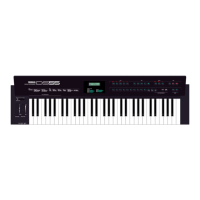
Overview of the DS55 control panel, including keyboard, volume, pitch bend, modulation wheel, and LCD.
Explains the default mode for playing a single voice on the keyboard.
How to navigate and understand the voice editing parameter displays.
Editing parameters for Tone, Wave, and Volume.
Editing parameters for Attack, Decay, and Release of amplitude.
Editing parameters for Attack, Decay, and Release of brilliance.
Controls LFO speed, vibrato depth, and tremolo depth.
Parameters for Pitch Bend Range, Modulation Wheel, and Breath Controller.
Covers memory protect and storing edited voices.
How to set Number, Tempo, Melody Voice, and Key for sequences.
Instructions on how to start and play auto performance sequences.
Overview of the DS55's MIDI capabilities and connections.
How to play the DS55 keyboard to control multi-instrument sounds.
 General
| Brand | Yamaha |
|---|---|
| Model | DS-55 |
| Category | Synthesizer |
| Language | English |

 To Next Page