EasyManua.ls Logo

Yamaha DSP-1 - TROUBLESHOOTING

Yamaha DSP-1
40 pages
Print Icon
To Previous Page IconTo Previous Page
Loading...
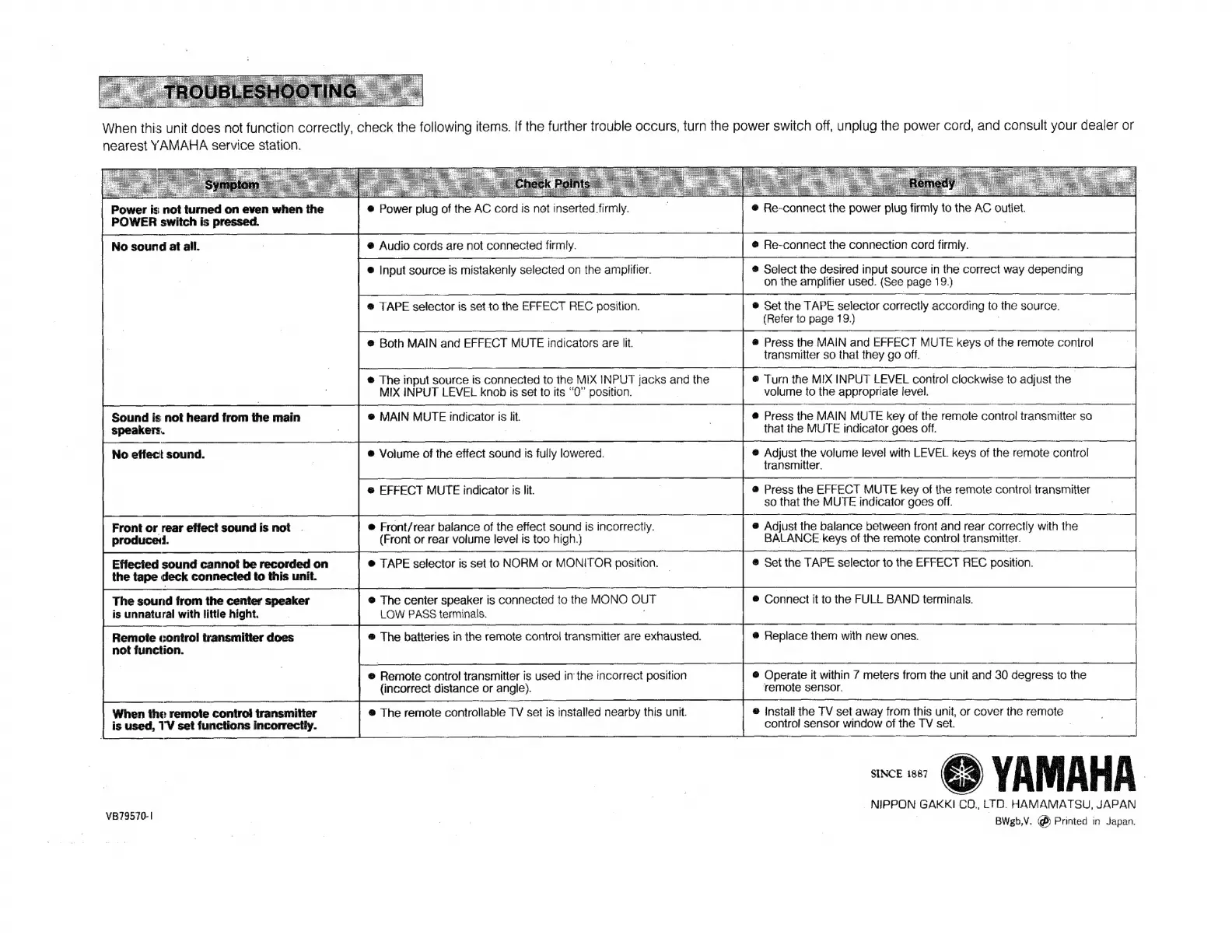
When
this
unit
does
not
function
correctly,
check
the
following
items.
If
the
further
trouble
occurs,
turn
the
power
switch
off,
unplug
the
power
cord,
and
consult
your
dealer
or
nearest
YAMAHA
service
station.
Power
is
not
turned
on
even
when
the
POWER
switch
is
pressed.
No
sound
at
all.
Sound
is
not
heard
from
the
main
|
Speakers.
No
effect
sound.
Front
or
rear
effect
sound
is
not
produceti.
Effecied
sound
cannot
be
recorded
on
the
tape
deck
connected
to
this
unit.
The
sound
from
the
center
speaker
is
unnatural
with
little
hight.
Remote
control
transmitter
does
not
function.
When
the
remote
contro!
transmitter
is
used,
TV
set
functions
incorrectly.
VB79570-1
©
Power
plug
of
the
AC
c
cord
is
not
‘inserted
firmly.
@
Audio
cords
are
not
connected
firmly.
@
Input
source
is
mistakenly
selected
on
the
amplifier.
@
TAPE
selector
is
set
to
the
EFFECT
REC
position.
®
Both
MAIN
and
EFFECT
MUTE
indicators
are
lit.
.
®
The
input
source
is
connected
to
the
MIX
INPUT
jacks
and
the
MIX
INPUT
LEVEL
knob
is
set
to
its
“0”
position.
ə
MAIN
MUTE
indicator
is
lit.
®
Volume
of
the
effect
sound
is
fully
lowered.
@
EFFECT
MUTE
indicator
is
lit.
®
Front/rear
balance
of
the
effect
sound
is
incorrectly.
(Front
or
rear
volume
level
is
too
high.)
è
TAPE
selector
is
set
to
NORM
or
MONITOR
position.
®
The
center
speaker
is
connected
to
the
MONO
OUT
LOW
PASS
terminals.
@
The
batteries
in
the
remote
control
transmitter
are
exhausted.
®
Remote
control
transmitter
is
used
in
the
incorrect
position
(incorrect
distance
or
angle).
®
The
remote
controllable
TV
set
is
installed
nearby
this
unit.
®
Re-
connect
the
power
plig
firmly
to
the
AC
outlet.
®
Re-connect
the
connection
cord
firmly.
®
Select
the
desired
input
source
in
the
correct
way
depending
on
the
amplifier
used.
(See
page
19.)
®
Set
the
TAPE
selector
correctly
according
to
the
source.
(Refer
ta
page
19.)
®
Press
the
MAIN
and
EFFECT
MUTE
keys
of
the
remote
control
transmitter
so
that
they
go
off.
®
Turn
the
MIX
INPUT
LEVEL
control
clockwise
to
adjust
the
|
volume
to
the
appropriate
ievel,
e
Press
the
MAIN
MUTE
key
of
the
remote
control
transmitter
so
that
the
MUTE
indicator
goes
off.
@
Adjust
the
volume
level
with
LEVEL
keys
of
the
remote
control
transmitter.
@
Press
the
EFFECT
MUTE
key
of
the
remote
contro!
transmitter
so
that
the
MUTE
indicator
goes
off.
@
Adjust
the
balance
between
front
and
rear
correctly
with
the
BALANCE
keys
of
the
remote
control
transmitter.
@
Set
the
TAPE
selector
to
the
EFFECT
REC
position.
®
Connect
it
to
the
FULL
BAND
terminals.
ð
Replace
them
with
new
ones.
@
Operate
it
within
7
meters
from
the
unit
and
30
degress
to
the
remote
sensor.
®
Install
the
TV
set
away
from
this
unit,
or
cover
the
remote
control
sensor
window
of
the
TV
set.
_
NIPPON
GAKKI
CO.,
LTD.
HAMAMATSU,
JAPAN
BWgb,V.
(È
Printed
in
Japan.
SINCE
1887