TRIG1
1 :Medium ‚
TRIG3 ¡snare 0%
–Gain=65MVl= 15‚
TRIG3 snare 0%
–Gain=65MVl= 15‚
TRIG3 snare 0%
–Gain= 0MVl= 15‚
TRIG save to 5
TRIG save to 5
Are you sure ?
1
2
3
4
5
6
[English]
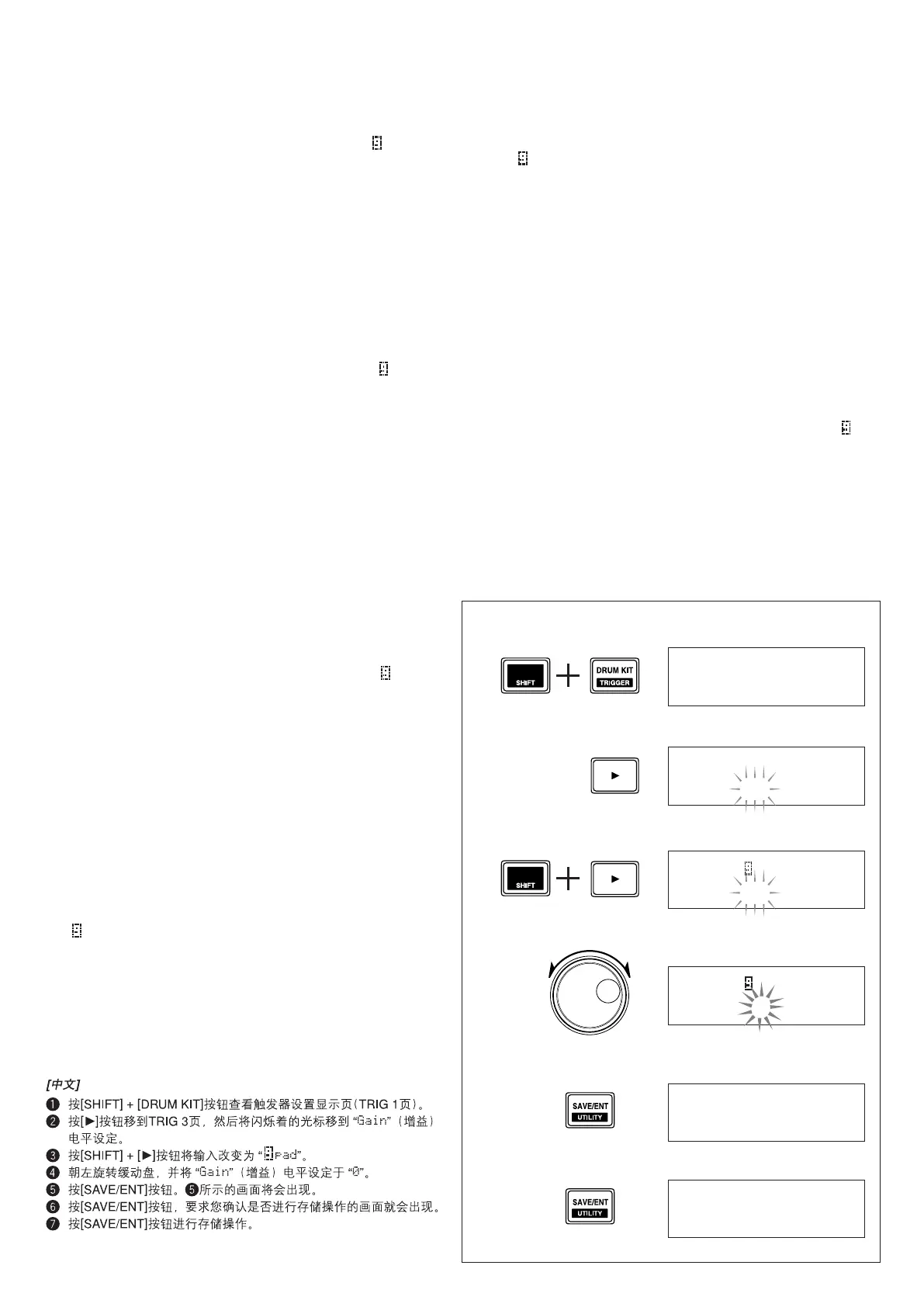
1 Press the [SHIFT] + [DRUM KIT] buttons to view the trigger setup
display page (TRIG 1 page).
2 Press the [>] button to move to the TRIG 3 page, and move the flash-
ing cursor to the “Gain” level setting.
3 Press the [SHIFT] + [>] buttons to change the input to “ pad”.
4 Rotate the jog dial to the left and set the “Gain” level to “0”.
5 Press the [SAVE/ENT] button. The display shown in 5 will appear.
6 Press the [SAVE/ENT] button and the display asking your confirma-
tion to proceed with the store operation appears.
7 Press the [SAVE/ENT] button to carry out the store operation.
[Français]
1 Appuyez sur les touches [SHIFT] + [DRUM KIT] pour afficher la page
de configuration des déclenchements (page TRIG1).
2 Appuyez sur la touche [>] pour passer à la page TRIG 3 et amenez le
curseur clignotant sur le réglage de niveau « Gain ».
3 Appuyez sur les touches [SHIFT] et [>] pour changer l’entrée en
« pad ».
4 Faites tourner la molette vers la gauche pour régler le niveau du
« Gain » à « 0 ».
5 Appuyez sur la touche [SAVE/ENT]. L’affichage illustré à la figure 5
apparaît.
6 Appuyez de nouveau sur la touche [SAVE/ENT]. La demande de con-
firmation de l’opération apparaît.
7 Appuyez une dernière fois sur [SAVE/ENT] pour confirmer l’opération
de mémorisation.
[Deutsch]
1 Drücken Sie die Tasten [SHIFT] + [DRUM KIT], um die Trigger-Setup-
Anzeige aufzurufen.
2 Blättern Sie mit Taste [>] bis zu Seite TRIG 3 und setzen Sie den
blinkenden Cursor auf den Pegelparameter „Gain“.
3 Drücken Sie die Tasten [SHIFT] + [>], um den Eingang „ pad“ auf-
zurufen.
4 Drehen Sie das Jog-Rad nach links, um den Pegel von „Gain“ auf „0“
zu stellen.
5 Drücken Sie die [SAVE/ENT]-Taste. Die bei 5 gezeigte Anzeige er-
scheint.
6 Drücken Sie die [SAVE/ENT]-Taste. Eine Anzeige fordert Sie nun zur
Bestätigung des Speichervorgangs auf.
7 Drücken Sie die [SAVE/ENT]-Taste, um den Speichervorgang durch-
zuführen.
[Español]
1 Presione los botones [SHIFT] + [DRUM KIT] para ver la página de
visualización de la configuración de activadores (página TRIG 1).
2 Presione el botón [>] para ir a la página TRIG 3, y mueva el cursor
parpadeante al ajuste del nivel de ganancia “Gain”.
3 Presione los botones [SHIFT] + [>] para cambiar la entrada a “ pad”.
4 Gire el mando de lanzadera hacia la izquierda y ajuste el nivel de
“Gain” a “0”.
5 Presione el botón [SAVE/ENT]. Aparecerá la visualización mostrada
en el punto
5.
6 Presione el botón [SAVE/ENT] y aparecerá la visualización que le pe-
dirá su confirmación para proseguir la operación de almacenamiento.
7 Presione el botón [SAVE/ENT] para ejecutar la operación de almace-
namiento.
[ Italiano]
1 Premere i pulsanti [SHIFT] +[DRUM KIT] per visualizzare la pagina di
impostazione dei trigger (pagina TRIG 1).
2 Premere il pulsante [>] per portarsi alla pagina TRIG 3 e portare il
cursore che lampeggia sulla posizione di impostazione del livello
“Gain”.
3 Premere i pulsanti [SHIFT]+[>] per impostare l’ingresso “ pad”.
4 Girare la manopola jog verso sinistra e portare il livello “Gain” su “0”.
5 Premere il pulsante [SAVE/ENT]. Appare quindi l’indicazione mostra-
ta in 5.
6 Premere il pulsante [SAVE/ENT] ed apparirà una richiesta di confer-
ma dell’operazione di memorizzazione.
7 Premere il pulsante [SAVE/ENT] per procedere con l’operazione.
[Nederlandse]
1 Druk op [SHIFT] + [DRUM KIT] om de eerste pagina van het Trigger
Setup keuzescherm (TRIG 1) te openen.
2 Gebruik de [>] toets om naar paginanummer TRIG 3 te gaan en ver-
plaats de knipperende cursor naar de “Gain” niveau-instelling.
3 Druk op de [SHIFT] + [>] toetsen en verander de ingangsinstelling in
“ pad”.
4 Draai de jog draaiknop naar links en zet het “Gain” niveau op “0”.
5 Druk op de [SAVE/ENT] toets. Het bij 5 afgebeelde scherm zal nu
verschijnen.
6 Druk op [SAVE/ENT] zodat het scherm waarop u om bevestiging voor
het opslaan zal worden gevraagd.
7 Druk op [SAVE/ENT] om het opslaan definitief te maken.
DTXPLORERaddER0 05.4.26, 1:01 PMPage 3 AdobePageMaker6.0J/PPC


 To Previous Page
 Loading...