EasyManua.ls Logo

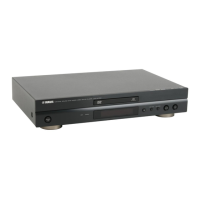
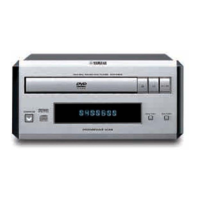
Yamaha DVD-S559MK2 - User Manual

Yamaha DVD-S559MK2
41 pages
Print Icon
To Next Page IconTo Next Page
Loading...
YAMAHA ELECTRONICS CORPORATION, USA
6660 ORANGETHORPE AVE., BUENA PARK, CALIF. 90620, U.S.A.
YAMAHA CANADA MUSIC LTD.
135 MILNER AVE., SCARBOROUGH, ONTARIO M1S 3R1, CANADA
YAMAHA ELECTRONIK EUROPA G.m.b.H.
SIEMENSSTR. 22-34, 25462 RELLINGEN BEI HAMBURG, GERMANY
YAMAHA ELECTRONIQUE FRANCE S.A.
RUE AMBROISE CROIZAT BP70 CROISSY-BEAUBOURG 77312 MARNE-LA-VALLEE CEDEX02, FRANCE
YAMAHA ELECTRONICS (UK) LTD.
YAMAHA HOUSE, 200 RICKMANSWORTH ROAD WATFORD, HERTS WD18 7GQ, ENGLAND
YAMAHA SCANDINAVIA A.B.
J A WETTERGRENS GATA 1, BOX 30053, 400 43 VÄSTRA FRÖLUNDA, SWEDEN
YAMAHA MUSIC AUSTRALIA PTY, LTD.
17-33 MARKET ST., SOUTH MELBOURNE, 3205 VIC., AUSTRALIA
2006
DVD-S559MK2
DVD-S559MK2
DVD PLAYER
LECTEUR DE DVD
G
OWNER’S MANUAL
MODE D’EMPLOI
BEDIENUNGSANLEITUNG
BRUKSANVISNING
GEBRUIKSAANWIJZING
MANUALE DI ISTRUZIONI
MANUAL DE INSTRUCCIONES
Printed in China 3139 245 22201
00cv_DVD-S559MK2_G.fm Page 1 Wednesday, March 15, 2006 8:16 PM

Table of Contents

Other manuals for Yamaha DVD-S559MK2

Questions and Answers

  • M
    Megan GarciaSep 18, 2025
    What to do if Yamaha DVD-S559MK2 displays no or distorted picture on NTSC TV?
    • J
      Joseph BeltranSep 18, 2025
      The default setting of [TV TYPE] may be PAL. Follow these steps to change the setting of [TV/ TYPE] to NTSC: 1. Press O9PEN/CLOSE ( ) on the front panel or press and hold STOP2 ( ) on the remote control to open the disc tray. 2. Press on the remote control. 3. Press AUDIO on the remote control.
  • S
    Sara CowanAug 25, 2025
    Why my Yamaha DVD-S559MK2 DVD Player disc does not play?
    • B
      bgoldenAug 25, 2025
      First, if you are using a CD-R/RW, DVD+R/RW/R DL or DVD-R/RW/R DL disc, make sure that it has been finalized. Ensure that the disc label is facing up when you insert it. Try another disc to check if the disc is defective. If you have recorded a JPEG, MP3, or WMA disc yourself, verify that your disc contains at least 10 JPEG picture files or 5 MP3/WMA music tracks, and that the sampling rate and bit rate are compatible for MP3/WMA files, the resolution is compatible for JPEG files. Check the region code to ensure it's compatible with your player.
  • S
    Samantha WhiteAug 25, 2025
    How to fix a Yamaha DVD Player with no power?
    • C
      Chris ReevesAug 26, 2025
      To address a Yamaha DVD Player with no power, ensure the AC power cord is properly connected. Then, press the STANDBY/ON button located on the front panel to switch the power on.
  • K
    Kyle FordAug 26, 2025
    What to do if my Yamaha DVD Player has no picture?
    • J
      Julie PrestonAug 27, 2025
      If your Yamaha DVD Player displays no picture, first turn on your TV. Refer to your TV's manual to select the correct Video In channel until the DVD screen appears. Finally, verify that the video signal output setting on the DVD player matches the video connection you are using.
  • K
    kevinreedSep 19, 2025
    What to do if Yamaha DVD Player cannot read CDs or DVDs?
    • M
      Melody GreenSep 22, 2025
      Use a commonly available CD/DVD lens cleaner to clean the lens before sending this unit for repair.
  • W
    Willie GraySep 23, 2025
    Why I am unable to turn on or off progressive scan on Yamaha DVD Player?
    • S
      Stephen WoodSep 23, 2025
      Check that the output of the video signal is switched to “YUV”.
  • F
    Faith HayesSep 9, 2025
    What to do if my Yamaha DVD Player remote control is not working?
    • M
      Michael MooreSep 10, 2025
      First, ensure that you are aiming the remote control directly at the remote control sensor located on the front panel of your Yamaha DVD player. If that doesn't work, try reducing the distance between the remote and the unit. If the problem persists, replace the batteries in the remote control, making sure to reinsert them with the correct polarities (+/– signs).
  • C
    Carolyn OwenSep 12, 2025
    How to turn on Yamaha DVD-S559MK2 if it has no power?
    • J
      Joshua MooreSep 12, 2025
      Ensure the AC power cord is properly connected to your Yamaha DVD Player. Then, press the STANDBY/ON button on the front panel to turn on the power.
  • A
    April OliverSep 3, 2025
    Why is there no sound and picture on my Yamaha DVD-S559MK2 DVD Player?
    • A
      Alexander WongSep 3, 2025
      If you are experiencing no sound and picture on your Yamaha DVD Player, check that the RGB/SCART cable is connected to the correct device.
  • T
    Tina BallardSep 1, 2025
    Why does my Yamaha DVD-S559MK2 DVD Player picture freeze during playback?
    • S
      Sierra LittleSep 1, 2025
      If you experience a momentary picture freeze during playback on your Yamaha DVD Player, inspect the disc for fingerprints or scratches. Clean the disc with a soft cloth, wiping from the center to the edge.

Summary

Important Safety Precautions

General Operating Cautions

Instructions for safe and proper unit operation and placement.

Fire and Moisture Warning

Warning to reduce the risk of fire or electric shock by avoiding rain or moisture.

Laser Safety Information

Details on laser safety, potential eye injury, and emitter specifications.

Introduction

Region Codes and Accessories

Information on DVD region compatibility and supplied accessories.

Disc and Content Format Compatibility

Details on compatible disc types and content formats.

Disc Cleaning and Patent Notices

Instructions for cleaning discs and patent information.

Functional Overview

Front Panel Controls and Display

Description of the DVD player's front panel controls and indicators.

Rear Panel Connections

Description of the DVD player's rear panel connection ports.

Remote Control Functions

Explanation of the functions of the remote control buttons.

Connections

General Connection Notes

Important guidelines before making connections.

Audio Connections

Details on connecting digital and analog audio outputs.

Video Connections

Instructions for connecting video outputs via Component, S-Video, Composite, SCART.

Getting Started

Remote Control Setup and Handling

Guide for inserting batteries, using, and handling the remote control.

Initial Power On and TV Setup

Steps to turn on the unit and configure TV type and color system.

Display and Language Preferences

Setting aspect ratio, OSD language, and preferred playback languages.

Disc Operations

Basic Playback and Controls

Performing basic playback, pausing, stopping, and searching.

Playback Modes and Navigation

Using repeat, shuffle, slow motion, zoom, menus, and OSD.

Special Content Playback

Playing DVDs, data discs (MP3/WMA/DivX), and VCD/SVCD features.

Setup Menu

General Setup Configuration

Configuring disc lock, display brightness, track programming, and disc unlocking.

Audio and Video Setup

Adjusting audio outputs, digital output, and video display settings.

Preference and Language Settings

Setting audio, subtitle, parental control, and DivX subtitle languages.

System Management

Managing system settings like resetting and password changes.

Language Codes

Language Selection Codes

List of codes for selecting various languages for audio/subtitle/menu.

Troubleshooting

Power, Picture, and Display Issues

Solutions for no power, no picture, distorted picture, and display size problems.

Audio and Connection Problems

Solutions for no sound, distorted sound, and digital output issues.

Disc Playback and Unit Responsiveness

Troubleshooting disc reading, playback, remote control, and unit response.

Glossary

Technical Terms and Definitions

Explanations of various technical terms used in the manual.

Specifications

Playback System and Video Performance

Details on supported playback systems and video output specifications.

Audio Format and Performance

Specifications for audio formats and audio performance metrics.

Connections and Cabinet

Specifications for various connections and physical cabinet dimensions.

Power Supply

Power requirements and usage specifications.

Yamaha DVD-S559MK2 Specifications

Video Performance IconVideo Performance
video output1 Vpp into 75 ohm
S-Video output Y1 Vpp into 75 ohm
RGB (SCART) output0.7 Vpp into 75 ohm
Audio Performance IconAudio Performance
DA Converter24 bit
Signal-Noise105 dB
Dynamic range97 dB
Power IconPower
power inlet230 V, 50 Hz
power usage12 W
power usage standby< 1 W
Weight and Dimensions IconWeight and Dimensions
dimensions435 x 310 x 51 mm
weight2.6 kg

Related product manuals