EasyManua.ls Logo

Yamaha Electone FE-40 - Sustain and Reverb Effects; Glide and Manual Balance Controls

Yamaha Electone FE-40
24 pages
Print Icon
To Next Page IconTo Next Page
To Previous Page IconTo Previous Page
Loading...
—
FOOT
SWITCH
—
Eu
SHORT
SHORT
UPPER
ds:
ASSIST
Eb
SUSTAIN
х
Ы
а
ТСИ
UPPER
LOWER
PEDAL
—
KNEE
LEVER
—
ensi
USE
---
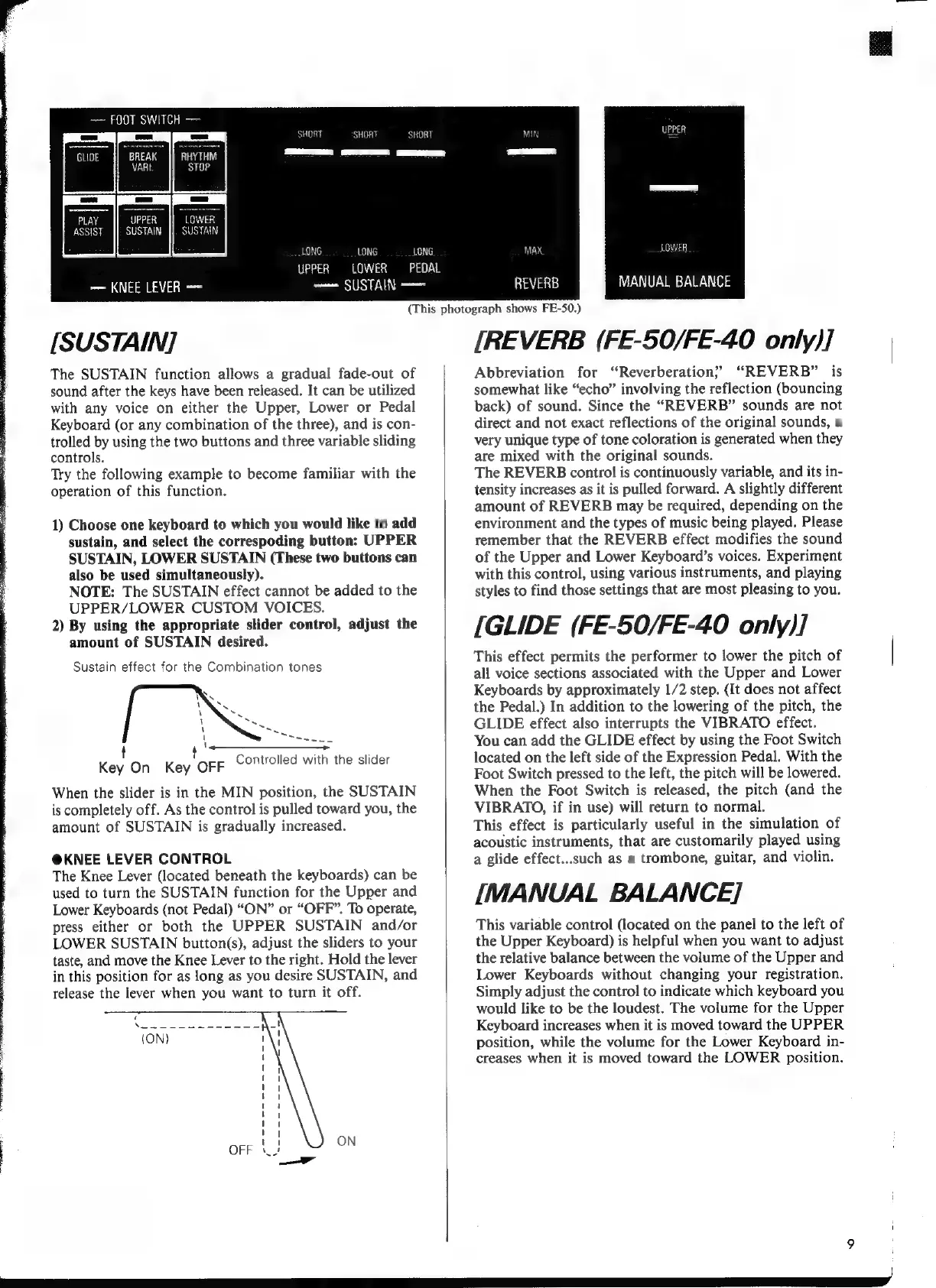
[SUSTAIN]
The
SUSTAIN
function
allows
a
gradual
fade-out
of
sound
after
the
keys
have
been
released.
It
can
be
utilized
with
any
voice
on
either
the
Upper,
Lower
or
Pedal
Keyboard
(or
any
combination
of
the
three),
and
is
con-
trolled
by
using
the
two
buttons
and
three
variable
sliding
controls.
Try
the
following
example
to
become
familiar
with
the
operation
of
this
function.
1)
Choose
one
keyboard
to
which
you
would
like
to
add
sustain,
and
select
the
correspoding
button:
UPPER
SUSTAIN,
LOWER
SUSTAIN
(These
two
buttons
can
also
be
used
simultaneously).
NOTE:
The
SUSTAIN
effect
cannot
be
added
to
the
UPPER/LOWER
CUSTOM
VOICES.
2)
By
using
the
appropriate
slider
control,
adjust
the
amount
of
SUSTAIN
desired.
Sustain
effect
for
the
Combination
tones
1
у
\
ES
On
Key
OFF
Controlled
with
the
slider
When
the
slider
is
in
the
MIN
position,
the
SUSTAIN
is
completely
off.
As
the
control
is
pulled
toward
you,
the
amount
of
SUSTAIN
is
gradually
increased.
@KNEE
LEVER
CONTROL
The
Knee
Lever
(located
beneath
the
keyboards)
can
be
used
to
turn
the
SUSTAIN
function
for
the
Upper
and
Lower
Keyboards
(not
Pedal)
“ON”
or
“OFF”.
To
operate,
press
either
or
both
the
UPPER
SUSTAIN
and/or
LOWER
SUSTAIN
button(s),
adjust
the
sliders
to
your
taste,
and
move
the
Knee
Lever
to
the
right.
Hold
the
lever
in
this
position
for
as
long
as
you
desire
SUSTAIN,
and
release
the
lever
when
you
want
to
turn
it
off.
(This
photograph
shows
FE-50.)
МАХ
Шы
E
MANUAL
BALANCE
REVERB
[REVERB
(FE-50/FE-40
only)]
Abbreviation
for
‘“Reverberation?
“REVERB”
is
somewhat
like
“echo”
involving
the
reflection
(bouncing
back)
of
sound.
Since
the
“REVERB”
sounds
are
not
direct
and
not
exact
reflections
of
the
original
sounds,
a
very
unique
type
of
tone
coloration
is
generated
when
they
are
mixed
with
the
original
sounds.
The
REVERB
control
is
continuously
variable,
and
its
in-
tensity
increases
as
it
is
pulled
forward.
A
slightly
different
amount
of
REVERB
may
be
required,
depending
on
the
environment
and
the
types
of
music
being
played.
Please
remember
that
the
REVERB
effect
modifies
the
sound
of
the
Upper
and
Lower
Keyboard’s
voices.
Experiment
with
this
control,
using
various
instruments,
and
playing
styles
to
find
those
settings
that
are
most
pleasing
to
you.
[GLIDE
(FE-50/FE-40
only)]
This
effect
permits
the
performer
to
lower
the
pitch
of
all
voice
sections
associated
with
the
Upper
and
Lower
Keyboards
by
approximately
1/2
step.
(It
does
not
affect
the
Pedal.)
In
addition
to
the
lowering
of
the
pitch,
the
GLIDE
effect
also
interrupts
the
VIBRATO
effect.
You
can
add
the
GLIDE
effect
by
using
the
Foot
Switch
located
on
the
left
side
of
the
Expression
Pedal.
With
the
Foot
Switch
pressed
to
the
left,
the
pitch
will
be
lowered.
When
the
Foot
Switch
is
released,
the
pitch
(and
the
VIBRATO,
if
in
use)
will
return
to
normal.
This
effect
is
particularly
useful
in
the
simulation
of
acoustic
instruments,
that
are
customarily
played
using
a
glide
effect...such
as
a
trombone,
guitar,
and
violin.
[MANUAL
BALANCE]
This
variable
control
(located
on
the
panel
to
the
left
of
the
Upper
Keyboard)
is
helpful
when
you
want
to
adjust
the
relative
balance
between
the
volume
of
the
Upper
and
Lower
Keyboards
without
changing
your
registration.
Simply
adjust
the
control
to
indicate
which
keyboard
you
would
like
to
be
the
loudest.
The
volume
for
the
Upper
Keyboard
increases
when
it
is
moved
toward
the
UPPER
position,
while
the
volume
for
the
Lower
Keyboard
in-
creases
when
it
is
moved
toward
the
LOWER
position.