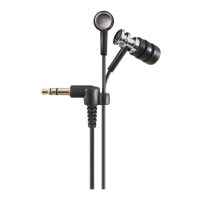
What to do if Yamaha EPH-M200 earphones volume is too high or too low?
- NNathaniel HessAug 10, 2025
If the earphone volume on your Yamaha Headphone is too high or too low, adjust the volume on the playback device or remote control as needed.
What to do if Yamaha EPH-M200 earphones volume is too high or too low?
If the earphone volume on your Yamaha Headphone is too high or too low, adjust the volume on the playback device or remote control as needed.
What to do if my Yamaha EPH-M200 has no sound?
If your Yamaha Headphone produces no sound, ensure the plug is fully inserted into the playback device's jack. Also, verify that the volume isn't set too low and that the playback device is both turned on and not paused.
Why is sound only coming from one side of my Yamaha EPH-M200?
If sound is only coming from one channel of your Yamaha Headphone, make sure the plug is fully inserted into the jack on the playback device.
How to fix Yamaha EPH-M200 when there is no sound?
If your Yamaha Headphone produces no sound, first ensure the headphone plug is fully inserted into the playback device's jack. Also, check that the volume isn't set too low and that the playback device is both turned on and not paused.
Why is my Yamaha EPH-M200 volume too high or low?
If the volume of your Yamaha Headphone is too high or too low, adjust the volume on the playback device or its remote control as needed.
Advisories on preventing hearing loss from prolonged high-volume earphone use and connection procedures.
Precautions regarding skin irritation, child safety, earpiece detachment, and magnetic field interference.
Guidelines for connecting devices, handling plugs, earphone maintenance, fit, and environmental exposure.
Recommendation to avoid using earphones at high volume in public places to prevent disturbing others.
Instructions on wearing earphones correctly with L/R marks and using the 6.3 mm adaptor if needed.
Guidance on selecting and fitting the most suitable earpiece size from the provided options.
Details on using the in-line remote and microphone for music playback and telephone functions with Apple devices.
Solutions for common issues like no sound, sound from one channel, volume problems, and remote control non-functionality.
Details on warranty policies for customers in the European Economic Area, Switzerland, Australia, U.S., and Canada.
Guidance for users on the collection and disposal of old electrical and electronic equipment according to EU directives.
| Type | In-ear |
|---|---|
| Driver | Dynamic |
| Frequency Response | 20 Hz - 20 kHz |
| Impedance | 16 Ohms |
| Cable Length | 1.2 m |
| Connector | 3.5 mm |