Trouble Recovery
95
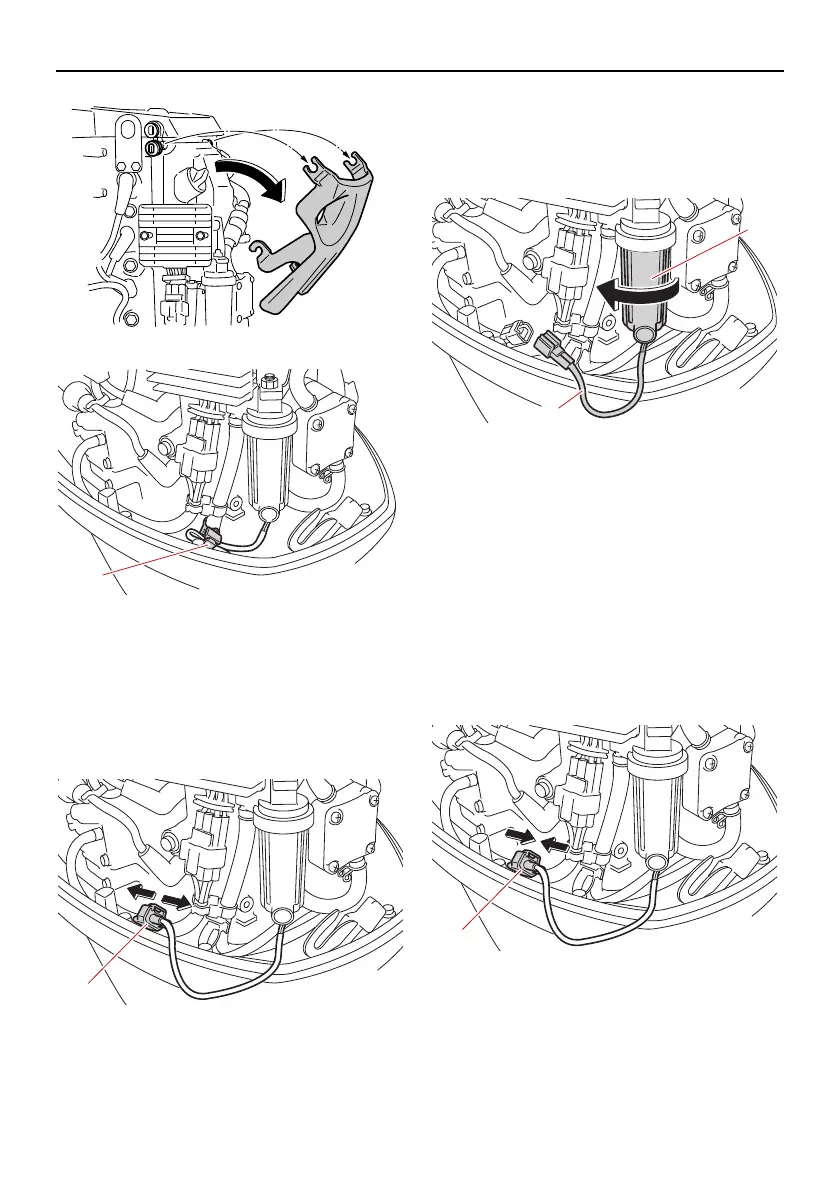
(4) Remove the holder.
(5) Disconnect the water detection switch
coupler. NOTICE: Be careful not to get
any water on the water detection
switch coupler, otherwise a malfunc-
tion could occur.
[ECM01951]
(6) Unscrew the filter cup from the filter
housing. NOTICE: Be careful not to
twist the water detection switch lead
when unscrewing the filter cup.
[ECM01961]
(7) Drain the water in the filter cup by soak-
ing it up with a rag.
(8) Firmly screw the filter cup onto the filter
housing. NOTICE: Be careful not to
twist the water detection switch lead
when screwing the filter cup onto the
filter housing.
[ECM01971]
(9) Connect the water detection switch cou-
pler securely until a click is heard.
(10)Fasten the water detection switch lead
with the holder.
1. Holder
1. Water detection switch coupler
1. Filter cup
2. Water detection switch lead
1. Water detection switch coupler
6C1-9-7J-1E0.book 95 ページ 2019年10月30日 水曜日 午後2時56分



 To Next Page