4
Step 2
Open My Maptuner software. Then click New User. Enter
your Email, Full Name, and Software Code that you received
when purchasing your license.
Your screen should look like this:
Your Login details will be emailed to you upon completion of
the New User form.
Step 1
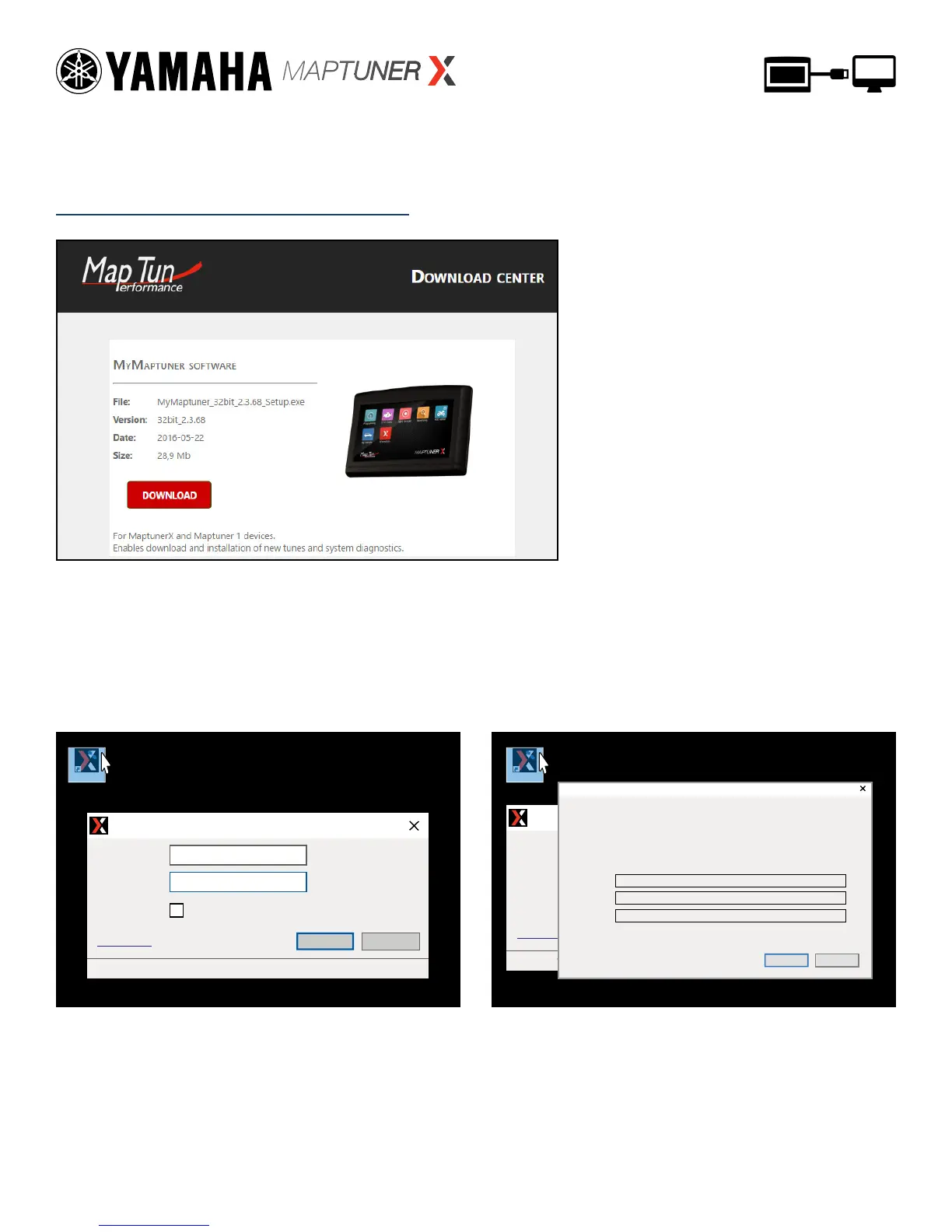
Download and install My Maptuner software according to
your Windows OS version.
https://maptuner.se/download/Default.aspx
MyMaptuner MyMaptuner
My Maptuner - Login
User Name:
Password:
My Maptuner v2.3.64.42540
Remember Me
New use
r...
OK Cancel
If you still do not have a user account in the Maptuner system you may create it here.
To proceed, you must specify:
-Your email address (your password will be mailed to this address)
-Your name
-A valid, not used and not user assigned software code
Email:
Full name:
Sw code:
OK Cancel
New User
My Maptuner - Login
User Name:
Password:
My Maptuner v2.3.64.42540
Remember Me
New use
r...
OK Cancel


 To Next Page