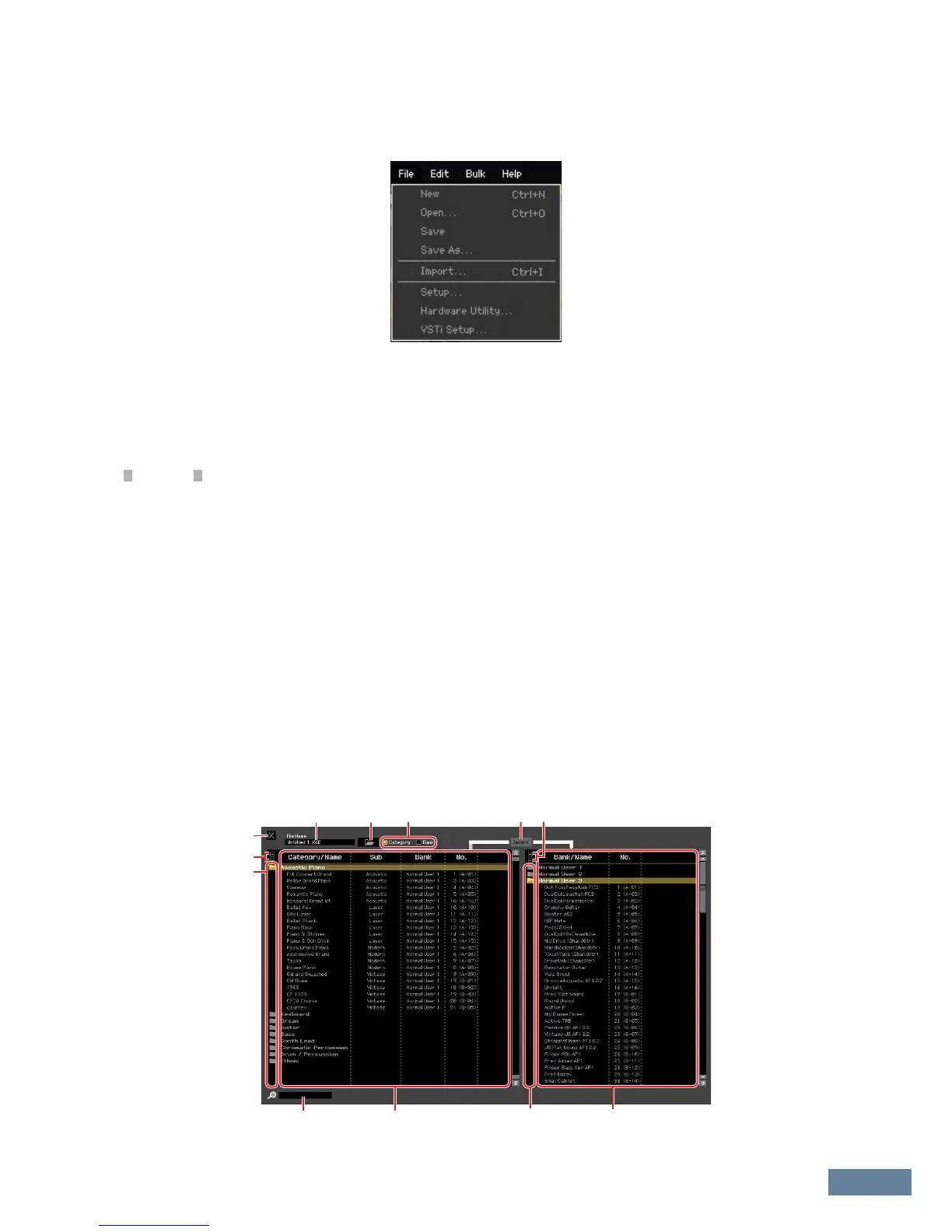
Menu: [File] menu
MOXF6/MOXF8 Editor Owner’s Manual
35
Menu
[File] menu
New
Creates and opens a new file containing the default Mixing setup and Voice data.
Open...
Opens an already saved file of the MOXF6/MOXF8 Editor.
Unlike files of other applications such as word processors, only a single file can be opened and edited on the MOXF6/MOXF8
Editor. Before opening a new file, make sure to save the edited settings as a file to avoid losing data.
Save
Saves the current settings by overwriting the current file.
Save As...
Saves the current settings as a MOXF6/MOXF8 Editor file (.X6E) under a new or different name.
Import
Imports the Voice data from another MOXF6/MOXF8 Editor file (.X6E) to the current file.
Click the File Select button (3), select a file including your desired Voice(s) so that the folders in the selected
file are listed as the Source Voice list (8), select a Voice or Voices or a folder or folders in the list (8), select
a destination location in the Destination Voice list (9) of the current file, then click [Import] (5) to execute the
Import operation.



 To Next Page