Instrument and control functions
5-18
1
2
3
4
5
6
7
8
9
10
11
12
13
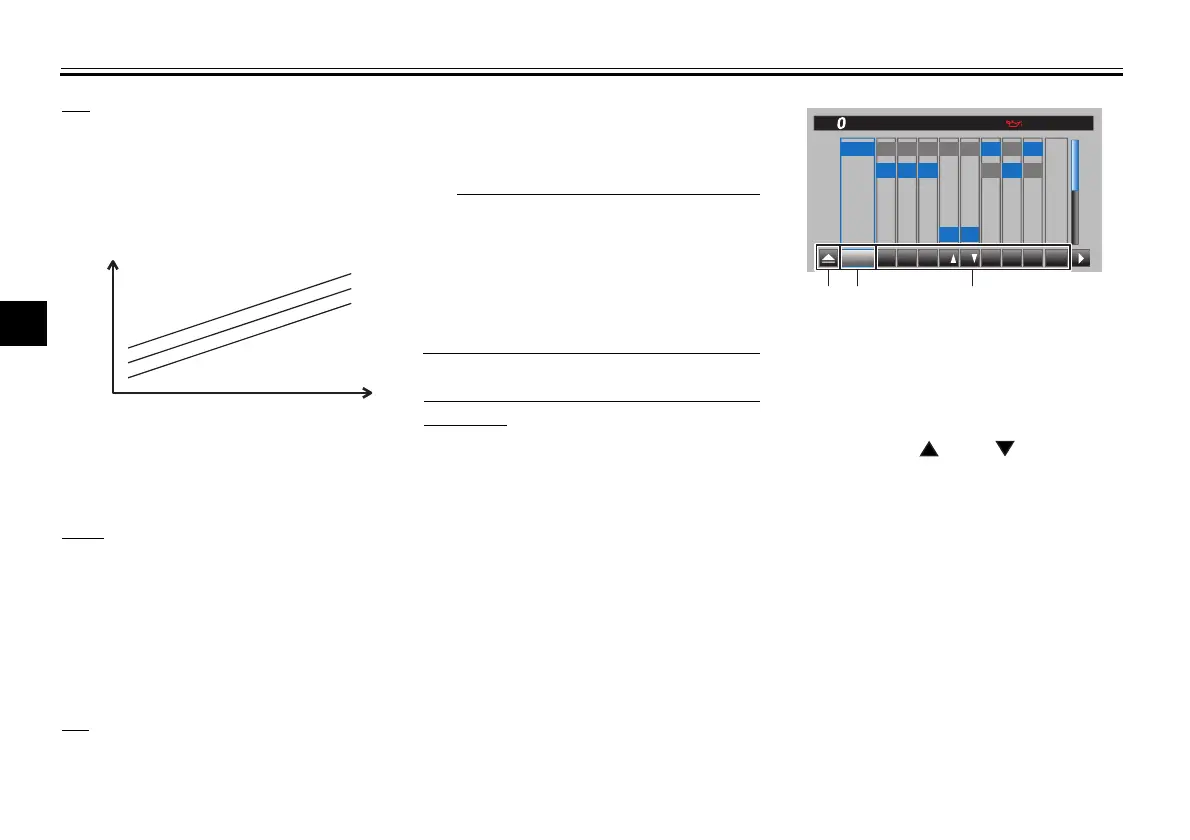
LIF
LIF can be set to 1, 2, 3, or OFF. Setting
level 3 most strongly reduces wheel lift,
and setting level 1 provides the least
system intervention. OFF turns LIF off.
EBM
This system has two settings. Level 1
provides the least system intervention,
and therefore the strongest engine
braking. Level 2 provides the most sys-
tem intervention, and therefore the
least engine braking.
BC
Select BC1 when only standard ABS is
desired. Select BC2 to have the brake
control system also regulate brake
pressure while cornering to suppress
lateral wheel slip.
For skilled riders and when riding at the
track, due to varying conditions, BC2
brake system engagement may come
on sooner than expected relative to
your desired cornering speed or intend-
ed cornering line.
To customize a YRC mode or adjust a
YRC item
1. While the “YRC Setting” screen is
displayed, and the YRC mode box
“YRC” is highlighted. Short push
the wheel switch to enter the box
and then select the YRC mode
preset (A, B, C, or D) that you want
to adjust.
2. Select the YRC item PWR, TCS,
SCS, QS , QS , LIF, EBM,
BC, or ERS that you want to ad-
just.
1. System intervention
2. Wheel lift
1
3
2
1
LIF
2
1. Triangle mark
2. YRC mode box
3. YRC item
PWR TCS SCS QS QS
LIF
EBM
ERS
BC
10
:
00
YRC Setting
A
B
C
D
1
2
3
4
3
4
5
1
2
3
OFF OFF
ONON
OFF
1
2
3
OFF
1
2
1
2
1
2
YRC
A-1
A-2
A-3
M-1
M-2
BC
MPH
132
BGG-28199-11.book 18 ページ 2022年8月25日 木曜日 午後3時8分


 To Next Page