MX49/MX61 Reference Manual
Basic Structure
Using a Connected
Computer
Using iOS
Applications
Basic Structure
Controller Block
Tone Generator Block
Effect Block
Arpeggio Block
Song/Pattern
Playing Block
Internal Memory
MIDI/Audio Signal Flow
Connecting to a computer
Creating a Song with a
computer
Reference
Performance
Song/Pattern
File
Utility
Remote
38
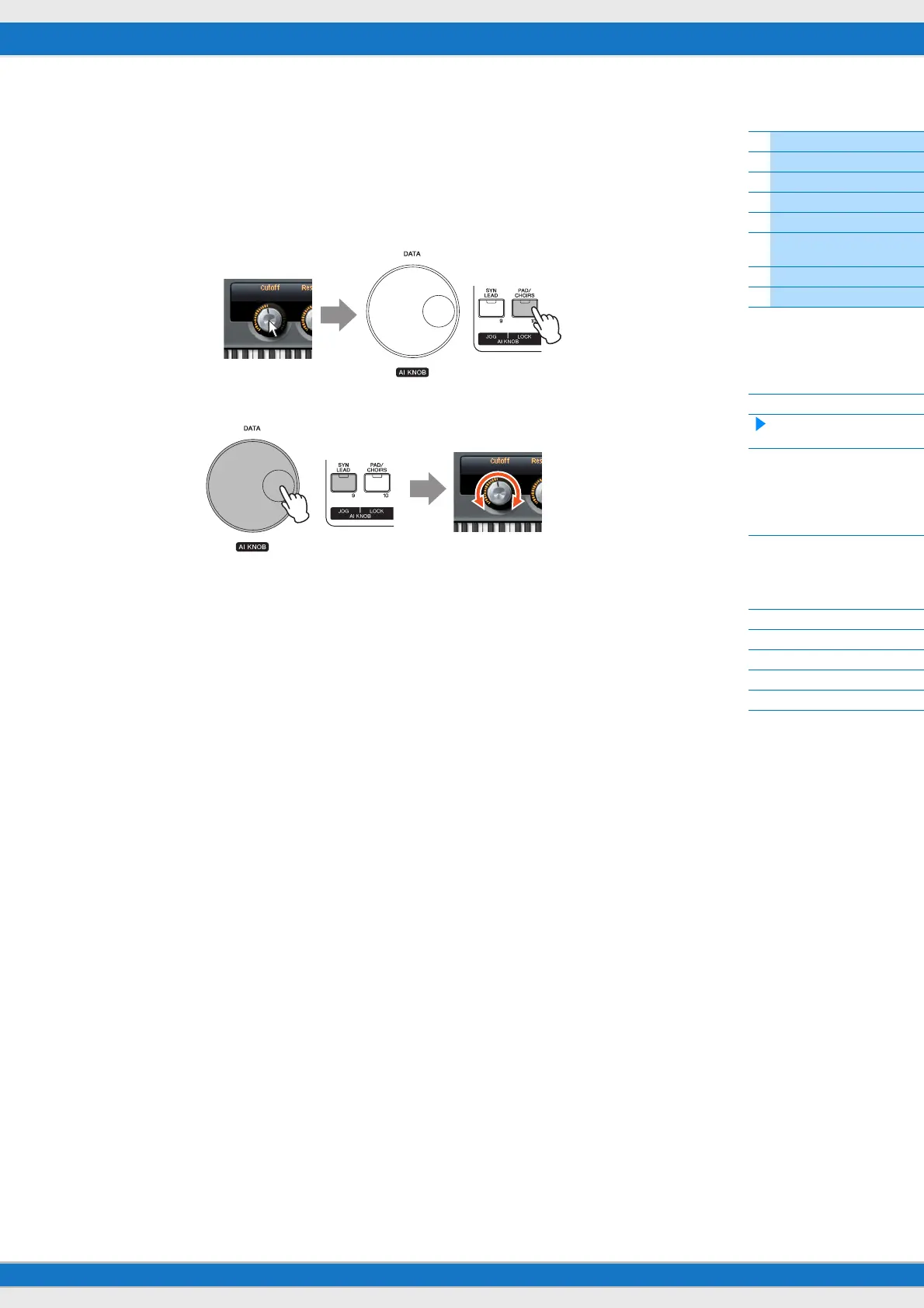
3 [LOCK] button
You can “lock” the parameter to be edited via the AI KNOB by turning this button on. When you locate the mouse pointer
to the desired parameter then turn the [LOCK] button on, the AI KNOB will control the “locked” parameter regardless of
the mouse pointer’s position. By turning the [LOCK] button off, you can unlock the parameter to be edited and the AI
KNOB can then be used to edit another parameter to which the mouse pointer is located. Turning [LOCK] on also lets
you “lock” the Jog wheel so that the time position continues moving until you reverse direction or stop it (by pressing
[STOP]).
Locking the parameter to be edited
Editing the “locked” parameter regardless of the mouse pointer’s location



 To Next Page