
 Need help?
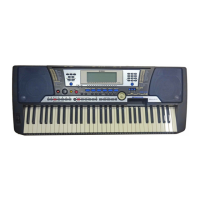
Do you have a question about the Yamaha Portatone PSR-540 and is the answer not in the manual?
 General
| Display | LCD |
|---|---|
| Amplifier | 5W + 5W |
| Type | Portable Keyboard |
| Effects | Reverb, Chorus, DSP |
| Headphone Jack | Yes |
| Polyphony | 32 |
| Styles | 160 styles |
| Sequencer | 6-track |
| MIDI | In/Out |
| Speakers | 12 cm x 2 |
| Keyboard | 61 keys |
| Connections | MIDI In/Out, Headphones, Sustain Pedal |
Essential safety precautions to avoid electrical shock, fire, or other hazards.
Basic precautions to avoid physical injury or damage to the instrument or property.
Instructions for initial setup and preparation of the PSR-540 before playing.
Introduction to key features of the PSR-540 with explanations and page references.
Explanation of fundamental operating conventions and display navigation.
Details about the buttons and controls on the PSR-540 panel.
Explanation of icons and indicators shown on the PSR-540 display.
Solutions for common problems encountered with the PSR-540's operation.
Overview of the PSR-540's user-friendly interface and quick panel operations.
Details on built-in effects like Reverb, Chorus, and DSP for enhancing sound.
Explanation of the auto accompaniment feature, including styles and one-touch settings.
Explanation of MIDI functionality for connecting and integrating with other devices.
Functionality for saving and recalling panel settings for quick performance setup.
Features for creating and recording original compositions with up to sixteen tracks.
Identification and numbering of controls located on the top panel of the PSR-540.
Identification of connectors and terminals on the rear panel of the PSR-540.
Instructions for connecting AC power adaptor or using batteries for power.
Guidance on connecting MIDI devices to the PSR-540 using TO HOST and MIDI terminals.
Shows menus and messages for current operations, guiding users through functions.
Instructions on how to access various function displays by pressing panel buttons.
Examples illustrating how to interpret display messages and use the Easy Navigator for operations.
Detailed steps for selecting menus, functions, and options using the data dial or navigation buttons.
Methods for setting numeric values using number buttons or the data dial, including one- or two-digit entry.
Mode for playing the keyboard normally and using auto accompaniment with styles.
Mode for playing the keyboard and playback of songs from disks.
Mode for recording original performances, songs, styles, and multi pad phrases.
Step-by-step instructions for choosing and activating a voice using the VOICE R1 button.
Steps to start auto accompaniment using only the rhythm tracks.
Instructions for enabling auto accompaniment with all tracks, including synchronized start.
Explanation of Intro, Main A/B, Fill-in, and Ending sections for dynamic arrangements.
How to change the tempo using the TEMPO/TAP button or the tap function.
Explanation of different fingering modes for playing chords with the left hand.
Instantly reconfiguring panel settings to match a selected style with a single button press.
Steps to save current panel settings to a Registration Memory location.
How to recall saved panel settings by pressing Registration Memory buttons.
Process for formatting commercially available floppy disks for use with the PSR-540.
Steps to save User styles, pads, and registration memory data to floppy disks.
Instructions for reloading user style, pad, and registration memory data from a floppy disk.
Procedure for making backup copies of important song data from one disk to another.
How to delete individual files like user songs, styles, and pads from a floppy disk.
Steps to select and play a desired song from a disk.
Detailed steps for performing a quick recording, including selecting record methods.
Step-by-step guide for multi-track recording, including track and part selection.
Aligning recorded notes in style tracks to a specified timing value.
Connecting the PSR-540 to other devices or computers using MIDI and TO HOST terminals.
Examples of using the PSR-540 as a multi-tone generator, with other keyboards, or with computers.
Information on compatibility of song data formats (SMF, ESEQ, SFF) and voice allocation formats (GM, XG, DOC).
Steps for connecting the PSR-540 to a PC using MIDI terminals or the TO HOST terminal.
Instantly configuring transmit/receive settings for MIDI operations using templates.
Determining which PSR-540 data is transmitted via which MIDI channels.
How channels respond to received MIDI data, determining tone generator response.
Turning the metronome ON or OFF for practice and recording assistance.
Information on backing up panel settings and initializing the instrument to factory presets.

 To Next Page


