•
Remote Control Guide
H
OW
T
O
P
ROGRAM
TV R
EMOTE
F
UNCTIONS
To program basic functions of the TV remote, we suggest
you learn functions into all the shaded buttons shown in
the illustration on the left:
1. On the Yamaha remote, slide the MEMORY switch
to position B.
2. Aim the TV remote control transmitter (usually
located at the top) at the top of the Yamaha remote.
3. On the Yamaha remote, use a paper clip or mechani-
cal pencil to press LEARN. The TRANSMIT/
LEARN red LED will start to flash.
NOTE: If there is no operation for about 30 seconds
after a button is pressed, the TRANSMIT/LEARN
LED will flash repeatedly. If this occurs, restart from
step 3.
4. On the Yamaha remote, press and release the
button to which you want to assign the function.
The TRANSMIT/LEARN LED will illuminate.
5. On the TV remote, press and release the button for
the corresponding function. After one second, the
TRANSMIT/LEARN LED will flash slowly.
6. The TRANSMIT/LEARN red LED on the Yamaha
remote control will flash slowly after the function is
learned.
NOTE: If the TRANSMIT/LEARN red LED on the
Yamaha remote flashes rapidly, the function has not
been learned. Repeat steps 5 and 6 to program the
function.
7. Continue programming until you have learned
functions into all of the shaded buttons.
8. Press LEARN.
9. To test programming, press TV (power) to turn on the
TV. Then press each button you’ve programmed.
Repeat steps 1 through 8 for any function that does
not respond.
TT
R
R
A
A
N
S
M
I
L
E
N
T
A
P
E
C
D
D
T
U
NE
R
R
R
C
V
C
LE
A
RLE
AA
A
REC
PAUSE
A
R
N
M
C
R
O
B
B
I
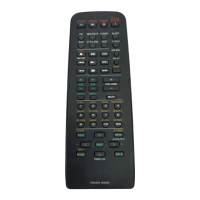
Remote With Lid Open
TV Remote Control
2~4"
TT
R
R
A
A
N
S
M
I
L
E
N
T
A
P
E
C
D
D
D
T
U
NE
R
R
R
C
V
V
V
DD
D
D
L
TB
S
V
—
A
U
X
PH
OO
N
EE
FF
CT
M
M
MA
S
SS
T
T
T
E
E
E
E
R
R
V
O
O
L
U
C
LE
A
RLE
AA
A
REC
PAUSE
A
R
N
M
C
R
O
B
B
Y
P
W
V
CR
V
OFF
R
R
R
R
E
M
OOO
T
TT
TT
E
E
C
N
N
L
A
S
M
I
I
I
S
C
S
T
O
P
M
O
O
II
ENHANCEDPRO LOGIC
TEST
T
1
23
456
789
0
A
R
DD
SSC
C
UMOVIE
MONO
VIDEO
CONCERT
K
AH
LL
SLEEP 2CH/6CH
T
IM
EEE
DELAY
CENTER
REAR
SWFR
LL
V
Slide
MEMORY
Switch
To B
TV INPUT
CHANNEL UP
TV POWER
Remote With Lid Open
LOCATIONS OF TV LEARNING BUTTONS
VOLUME
DOWN
CHANNEL
KEYPAD
(0~9)
VOLUME
UP
CHANNEL
DOWN



 To Next Page