12
RM-WAP-16 RM-WAP-8 Owner’s Manual
2. Plug the LAN cable into the Dante/PoE port.
NOTICE
: Use STP (Shielded Twisted Pair) cable to prevent electromagnetic interference.
: When disconnecting the LAN cable from the Dante/PoE port, wait at least
five seconds before reconnecting the cable. Otherwise, damage or malfunctions
may result.
NOTE : We recommend using single-pair Ethernet cables in order to stabilize power
supply via PoE.
: If necessary, route the LAN cable through the cable slots.
3. Attach a commercially available safety wire.
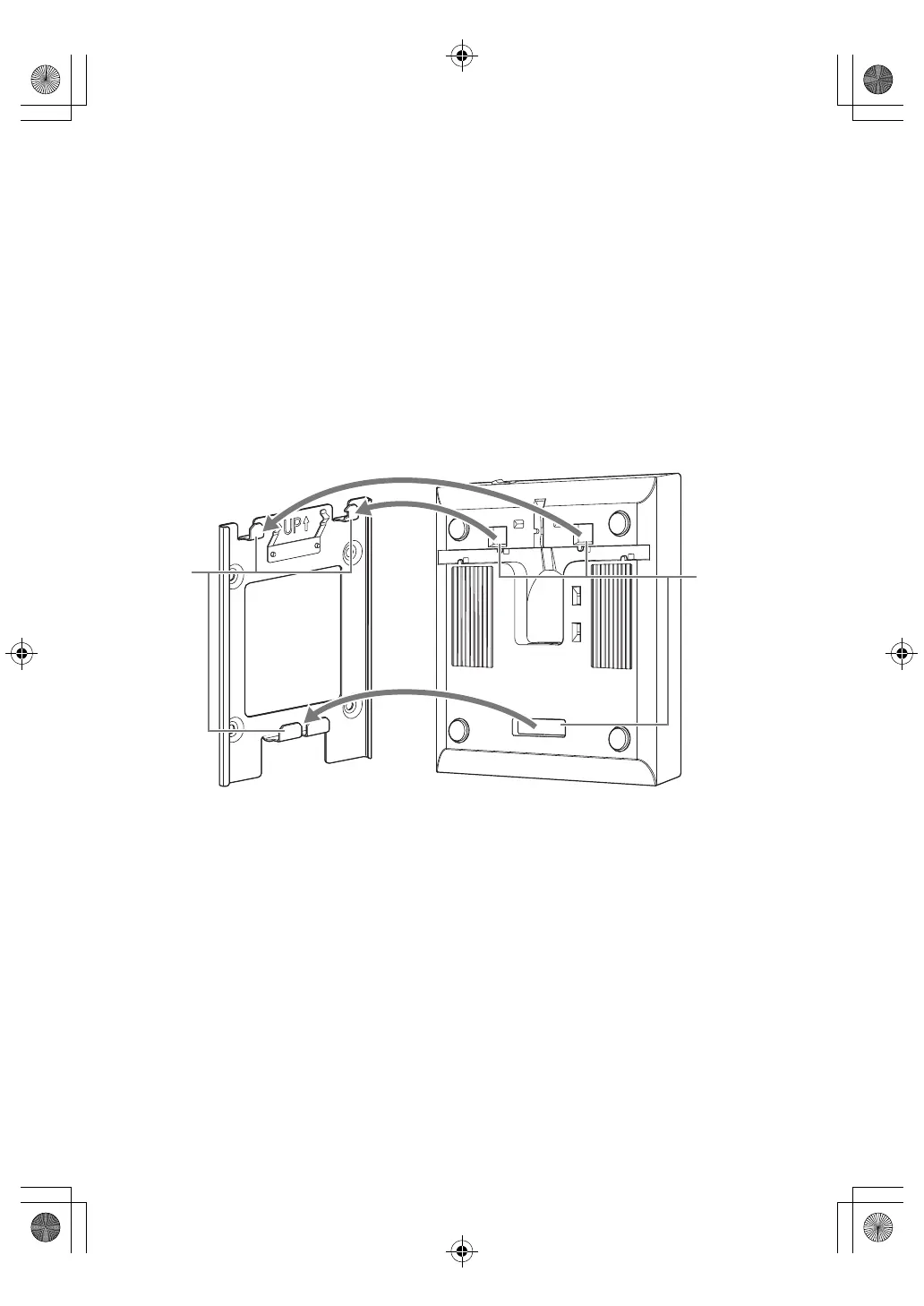
4. Align the hooks on the mounting bracket with the mounting cutouts
(holes) in this unit.
RM-WAP-16_RM-WAP-8_om_7multi_A0.book 12 ページ 2021年2月5日 金曜日 午後3時28分


 To Next Page